
Jefferson Parish Water Bill: Pay Online, Phone Number, Paystar, Drop Box and Leak Help
Jefferson Parish utility customers can pay water and utility bills online through Paystar, by phone, by mail, or by drop box. This guide gives you the official Paystar links, Utility Customer Service phone number, East Bank and West Bank drop box addresses, mail address, new service help, after-hours leak numbers and leak adjustment steps in one practical place.
How to pay a Jefferson Parish water bill
To pay a Jefferson Parish water bill online, start from the official Pay Utility Services Bill page or use the official Paystar utility payment portal. For account questions, new service, turning water on or off, bill problems, water service issues, website issues or leak reporting during business hours, call 504-736-6060.
What do you need to do today?
Jefferson Parish has different routes for Paystar payment, phone payment, drop boxes, mail payment, new service, leak reporting and leak adjustment. Pick the route that matches your issue.
Official Jefferson Parish water bill payment links
Use these official Jefferson Parish and Paystar links for utility bill payment, Paystar account tools, customer service, new service, drop-box information, water problem reporting and leak adjustment help.
Jefferson Parish water bill Paystar and drop box screenshot guide
The screenshot below helps users recognize the Jefferson Parish water bill payment options before using the official Paystar portal, phone payment, drop box, mail payment or leak help links.
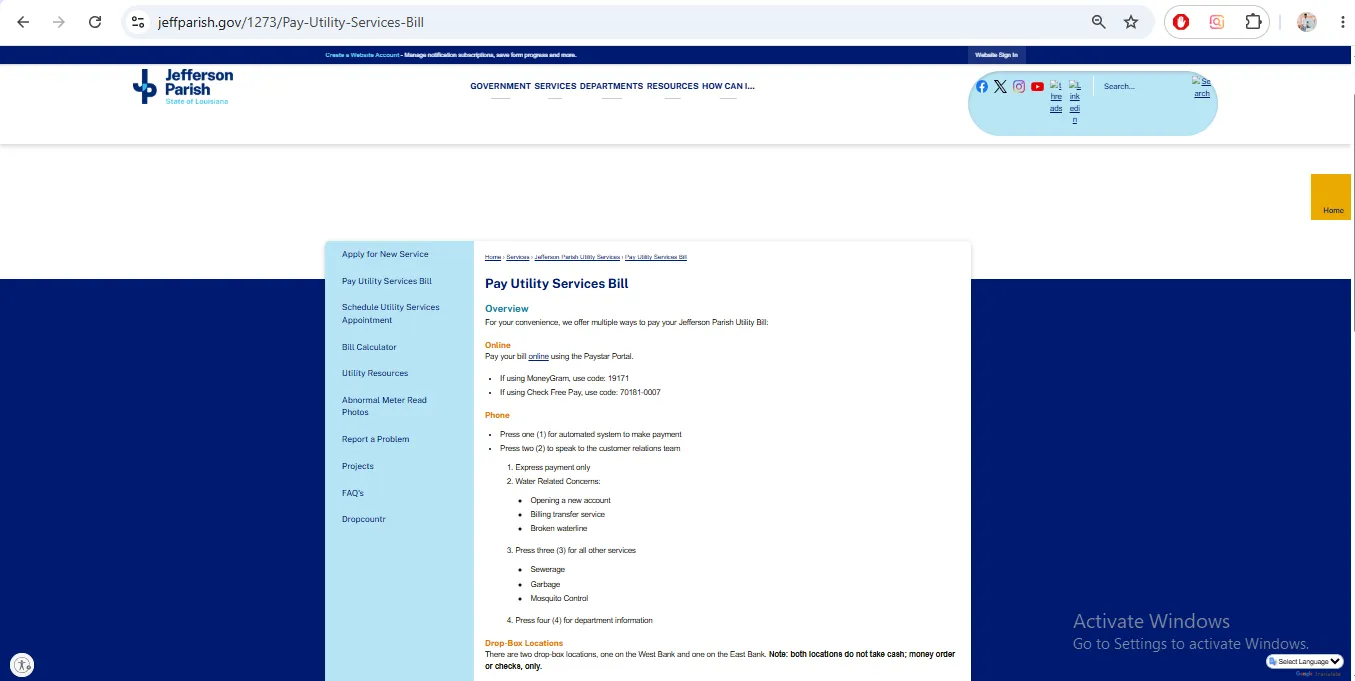
Image note: This image is used only as a user-help visual reference near the official action section. It is not payment proof, account proof, a live portal, or an official endorsement.
How to pay your Jefferson Parish water bill online through Paystar
Paystar is the main online route for Jefferson Parish utility bill payment. You can make a payment quickly or create an account if you want more portal features.
What Jefferson Parish Paystar can do
Jefferson Parish says the Paystar system is mobile-first and gives customers more utility account payment tools.
Find balance and pay
Use a few pieces of information from your bill to find the utility account and balance due.
Manage payment history
Create an account to view payment history, eBill and saved payment methods.
AutoPay and alerts
Paystar can support AutoPay by card or bank and email/text notifications.
Jefferson Parish water bill phone number and phone menu
Jefferson Parish Utility Customer Service is the safest number for billing, account, water service, website and leak questions during business hours.
Jefferson Parish water bill drop box and mail payment options
Drop boxes and mail are useful for non-urgent check or money-order payments. They are not the best choice for immediate posting, urgent disconnection issues or same-day account confirmation.
| Payment route | Official location / address | Important rule |
|---|---|---|
| West Bank drop box | 4500 Westbank Expressway, Marrero, LA 70072 | Money order or checks only. No cash. |
| East Bank drop box | 1221 Elmwood Park Boulevard, Jefferson, LA 70123 | Money order or checks only. No cash. |
| Mail payment | Jefferson Parish Utility Services, P.O. Box 10007, Jefferson, LA 70181-0007 | Mail early and include accurate account details. |
| MoneyGram | Use MoneyGram code 19171 | Start from the official Parish payment page and verify before paying. |
| Check Free Pay | Use Check Free Pay code 70181-0007 | Start from the official Parish payment page and verify before paying. |
Map shows the East Bank drop box / Utility Services location at 1221 Elmwood Park Boulevard, Jefferson, LA 70123. Jefferson Parish also lists a West Bank drop box at 4500 Westbank Expressway, Marrero, LA 70072.
Jefferson Parish water bill payment methods compared
| Method | Best for | What to remember |
|---|---|---|
| Paystar online | Fast online utility bill payment and account tools. | Use the official Parish-linked Paystar portal. |
| Paystar account | AutoPay, eBill, payment history, text/email notices and multiple accounts. | Create an account only through the official Paystar route. |
| Phone payment | Customers who prefer phone payment or cannot access the portal. | Use the Parish phone menu or official Paystar pay-by-phone route. |
| Drop box | Non-urgent check or money-order payments. | No cash. Use East Bank or West Bank official drop box only. |
| Non-urgent mailed payment. | Mail to Jefferson Parish Utility Services, P.O. Box 10007, Jefferson, LA 70181-0007. | |
| Customer Service | Bill issues, new service, turn on/off water, website issues and leak reports. | Call 504-736-6060 during business hours. |
Jefferson Parish Utility Customer Service phone, hours and help topics
Use Utility Customer Service for account-specific questions that a normal payment portal cannot solve.
| Support item | Official detail | Use it for |
|---|---|---|
| Utility Customer Service | 504-736-6060 | New service, turning water on/off, water problem, leak, bill problem, water service issue and website issue. |
| Business hours | Monday-Friday, 8:30 AM-4 PM | Call during these hours for account and customer service support. |
| East Bank after-hours | 504-838-4363 | After-hours water problem or leak on the East Bank. |
| West Bank after-hours | 504-349-5081 | After-hours water problem or leak on the West Bank. |
| Joseph S. Yenni Building | 1221 Elmwood Park Boulevard, Jefferson, LA 70123 | East Bank Parish utility services location and drop box. |
| General Government Building | 200 Derbigny Street, Gretna, LA 70053 | West Bank Parish government location. |
Jefferson Parish new water service help
Use the official new service application if you are moving into an existing home, building a new home or starting a new utility service account.
Jefferson Parish water leak adjustment and high bill help
A high water bill can happen because of a hidden toilet leak, running water, plumbing repair, outside leak, old balance or increased consumption. Jefferson Parish Utility Services says leak adjustment may be available after water repairs.
Jefferson Parish water problem or leak emergency numbers
Use the after-hours emergency lines only for water problems or leaks such as no running water or broken water line. Use Utility Customer Service during business hours for normal account help.
| Issue | Correct route | What to tell them |
|---|---|---|
| Business-hours water problem or leak | Call 504-736-6060 | Account number, service address, type of problem and best callback number. |
| East Bank after-hours water problem | Call 504-838-4363 | Exact address, nearest cross street and whether water is running or line is broken. |
| West Bank after-hours water problem | Call 504-349-5081 | Exact address, nearest cross street and whether water is running or line is broken. |
| Website/payment portal issue | Call 504-736-6060 during business hours | Portal page, error message, account number and browser/device if needed. |
| Immediate danger | Call 911 first | Use emergency response if there is immediate danger to life, health or safety. |
What Jefferson Parish utility bill can include
Jefferson Parish says the utility bill may include more than water usage. This is why a “water bill” can look higher than expected even when water use is only one part of the total.
Common Jefferson Parish water bill payment mistakes
| Mistake | Why it causes trouble | Better action |
|---|---|---|
| Using unofficial payment links | Payment can be delayed, misdirected or processed through an unwanted third party. | Start from jeffparish.gov Pay Utility Services Bill or official Paystar portal. |
| Putting cash in a drop box | Jefferson Parish says drop boxes do not take cash. | Use check or money order only for drop boxes. |
| Calling after-hours line for normal billing | The after-hours emergency line is only for water problem or leak reporting. | Call 504-736-6060 during business hours for bill or account questions. |
| Waiting too long after a leak | Leak adjustment requires repair documentation and account review. | Fix the leak, keep receipts and contact Utility Customer Service quickly. |
| Mailing payment for urgent account | Mail can delay payment posting and confirmation. | Use Paystar or call customer service if the account is urgent. |
| Forgetting that utility bill includes multiple services | Customers may assume the full balance is only water usage. | Review water, sewer, garbage and other service lines separately. |
Official Jefferson Parish water bill resources used in this guide
| Official resource | Use it for | Open |
|---|---|---|
| Pay Utility Services Bill | Paystar online payment, phone menu, drop-box locations, mail address and bill video. | Open payment page |
| Paystar Utility Payment | Official online utility bill payment through Paystar. | Open Paystar |
| Jefferson Parish Payment Center | Paystar payment center and department payment options. | Open payment center |
| Paystar Portal Info | Paystar account benefits, AutoPay, eBill, payment history and payment method management. | Open portal info |
| Utility Customer Service Line | Customer service phone, hours and after-hours leak lines. | Open staff directory |
| Apply for New Service | New service form, same-day timing, deposit and required document guidance. | Open new service |
| Utility Resources | Leak adjustment, leak testing and high bill leak troubleshooting. | Open leak resources |
| Report a Problem | Business-hours water problem support and after-hours emergency lines. | Open report page |
Jefferson Parish water bill FAQs
How do I pay my Jefferson Parish water bill online?
Use the official Jefferson Parish Pay Utility Services Bill page or the official Paystar utility payment portal. Paystar is the official payment vendor for Jefferson Parish.
What is the Jefferson Parish Paystar link?
The official utility payment route is linked from Jefferson Parish’s Pay Utility Services Bill page and opens the Paystar utility payment portal.
Can I create a Paystar account?
Yes. Jefferson Parish says Paystar users can create an account to manage multiple accounts, enroll in AutoPay, view payment history, use eBill, manage payment methods and receive email or text notifications.
What is Jefferson Parish Utility Customer Service phone number?
Call 504-736-6060 for new service, turning water on or off, reporting a water problem or leak, bill problems, water service issues and website issues during business hours.
What are Jefferson Parish Utility Customer Service hours?
Jefferson Parish lists Utility Customer Service hours as Monday through Friday, 8:30 AM to 4 PM.
What is the Jefferson Parish phone payment menu?
The Parish payment page says press 1 for the automated payment system and press 2 to speak with the customer relations team. Paystar’s Jefferson Parish payment center page also lists Pay by Phone at 504-736-6000.
Where is the Jefferson Parish East Bank drop box?
The East Bank drop box is listed at 1221 Elmwood Park Boulevard, Jefferson, LA 70123.
Where is the Jefferson Parish West Bank drop box?
The West Bank drop box is listed at 4500 Westbank Expressway, Marrero, LA 70072.
Can I put cash in a Jefferson Parish drop box?
No. Jefferson Parish says both drop-box locations do not take cash. Use money order or checks only.
Where do I mail my Jefferson Parish utility bill payment?
Mail payment to Jefferson Parish Utility Services, P.O. Box 10007, Jefferson, LA 70181-0007.
What MoneyGram code does Jefferson Parish list?
The Parish payment page lists MoneyGram code 19171. Always confirm the code on the official page before paying.
What Check Free Pay code does Jefferson Parish list?
The Parish payment page lists Check Free Pay code 70181-0007. Always confirm the code on the official page before paying.
What is the East Bank after-hours water leak number?
For East Bank after-hours water problems or leaks, call 504-838-4363.
What is the West Bank after-hours water leak number?
For West Bank after-hours water problems or leaks, call 504-349-5081.
Can I get a Jefferson Parish leak adjustment?
Jefferson Parish Utility Services says it can provide a leak adjustment to customers who performed water repairs in their home. Repair receipts are required, and customers are only given one leak adjustment in a 12-month period.
How do I apply for new utility service in Jefferson Parish?
Use the official Apply for New Service page. The Parish says once information is reviewed, customers receive an email with further instructions. For same-day service, all required information and payment must be received by 2 PM.
What charges can appear on a Jefferson Parish utility bill?
The Parish bill explanation says bills can include water usage and service, sewer usage and service, garbage service, mosquito control, recreation service and a Louisiana Department of Health and Hospitals Safe Water Fee.
Is Water-Department.org the official Jefferson Parish website?
No. Water-Department.org is an independent guide. Official payments, account service, Paystar setup, drop-box instructions, new service, leak adjustments and emergency reporting must be handled through Jefferson Parish or official Paystar resources.
Last editorial check: June 2026. Payment links, phone numbers, Paystar features, payment fees, drop-box rules, mailing address, new service requirements, leak adjustment rules and emergency numbers can change. Confirm final details directly with Jefferson Parish Utility Services or the official Paystar portal.
Pay Smarter, Check High Bills, Start Service, Avoid Shutoff and Find Official Water Department Links
Use this free tool before paying a water bill, setting up autopay, starting or stopping service, checking a high bill, requesting leak help, or looking for the official water department portal. It gives practical next steps without collecting your account number or personal details.
What water bill or service problem do you need to solve?
Choose your situation. The tool will suggest the safest next step, what to prepare, and which official page to check first.
Start from the official water department, city, county or utility website before entering account details. Avoid random payment ads and look-alike bill pay sites.
Before paying a very unusual bill, check meter reads, toilet leaks, irrigation use, estimated bills, late fees, and whether your utility offers a leak adjustment.
Water Bill Payment Route Helper
Choose how you want to pay. The tool will tell you what to prepare and the safest payment path.
High Water Bill Checker
Compare your normal bill with the new bill and get a practical investigation path before calling customer service.
Leak Check and Adjustment Checklist
Use this before requesting a leak adjustment, disputing a bill, or calling the water department about high usage.
Start, Stop or Transfer Water Service Helper
Use this before moving, opening a new account, closing an old account, or transferring service to another address.
Past Due, Shutoff and Reconnection Helper
Use this if your account is late, disconnected, at risk of shutoff, or you need a payment plan or assistance program.
Simple Water Usage Cost Estimator
Estimate a rough bill from base charge, usage units, rate per unit, sewer charge, stormwater fee and service fees. Official tiered rates may be different.
Official Water Department Resource Finder
Enter city/utility and state to create safe searches for the official water bill portal, phone number, outage page, assistance, start service, leak adjustment, and Water-Department.org guide.
Water Department vs Payment Processor
- Water department: account help, service start/stop, leaks, repairs, shutoff, assistance.
- Payment processor: card/eCheck payment screen, payment fee, confirmation number, posting time.
Best sitewide placement
Add this tool after the main payment section or before FAQs. It helps users solve the next problem after reading the article.
Important safety note
This tool gives educational guidance only. Always confirm payment portals, phone numbers, account balance, assistance rules and reconnection steps with the official water department or utility.