
Sugar Land Water Bill: Pay Online, Phone Number, AutoPay, Start Service and Leak Adjustment
City of Sugar Land utility bills include water, wastewater and solid waste service. This guide gives you the official online payment route, one-time payment link, customer portal login, phone payment number, AutoPay setup, mail address, City Hall payment, drop boxes, start or cancel service steps, payment plan help, high bill checklist and leak adjustment instructions in one practical place.
How to pay a Sugar Land water bill
To pay a Sugar Land water bill online, start from the official City of Sugar Land Water Payment Options page. You can use one-time payment without registering, or use the customer portal for account access, bill details, past bills and AutoPay.
What do you need to do today?
Pick the correct Sugar Land utility task first. Payment, AutoPay, start service, cancellation, balance lookup and leak adjustment all use different official steps.
Official City of Sugar Land water bill links
Use these official links for water bill payment, account login, phone/mail payment, AutoPay, start/cancel service, e-Bill, leak adjustment, high bill help and water/wastewater customer support.
Sugar Land water bill pay screenshot guide
The screenshot below helps users recognize the City of Sugar Land water bill payment and account service options before using one-time payment, customer portal login, AutoPay, start service or leak adjustment links.
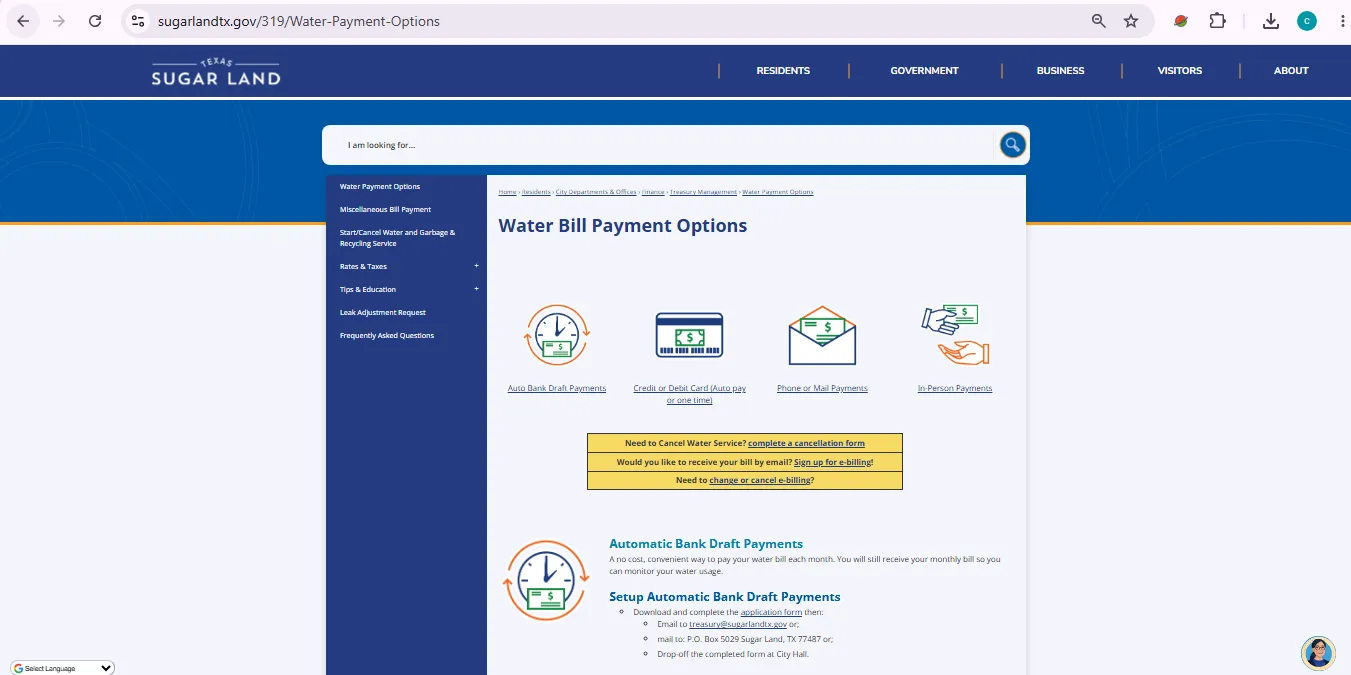
Image note: This image is used only as a user-help visual reference near the official action section. It is not payment proof, account proof, a live portal, or an official endorsement.
How to pay your Sugar Land water bill online
Use this flow if you want the safest official route and do not want to end up on a random third-party payment page.
Sugar Land water bill phone number, mail address, City Hall and drop boxes
Online payment is fastest, but Sugar Land also provides phone payment, mail payment, City Hall payment and city drop boxes.
| Payment route | Official detail | Best practice |
|---|---|---|
| Phone payment | Call 281-275-2750, select option 1, then enter customer number and account number. | Keep your bill ready before calling. |
| Mail payment | City of Sugar Land, P.O. Box 201594, Dallas, TX 75320-1594. | Mail early and include the payment stub or account details. |
| In-person payment | Sugar Land City Hall, 2700 Town Center Blvd. N., Sugar Land, TX 77479. | Visit Monday-Friday, 8 a.m.-5 p.m., excluding city holidays. |
| Drop boxes | Drop boxes are listed at multiple city facilities, including City Hall, Police Station, City Hall Annex and selected fire stations. | Do not use drop box for urgent late payments unless Treasury confirms timing. |
Set up Sugar Land AutoPay: bank draft or card AutoPay
Sugar Land gives two different automatic payment paths. Choose the correct one and cancel the old method if you are switching between bank draft and card AutoPay.
Automatic bank draft
A no-cost way to pay each month. You still receive your monthly bill so you can monitor usage.
Debit or credit card AutoPay
Managed through the online payment system after logging in or creating an account.
Do not double-enroll
Signing up for one automatic method does not automatically cancel the other automatic method.
Check Sugar Land water bill balance or ask for a payment plan
Use the customer portal or Treasury contact when you need balance lookup, bill details, payment plan, extension, name changes or login support.
Start or cancel Sugar Land water, garbage and recycling service
Use the official Start/Cancel page if you are moving in, moving out, changing account name or updating mailing address.
| Service task | Official rule | Action to take |
|---|---|---|
| Start service | You can request to start water service 24/7 by filling out the online application. | Use the residential or commercial application on the official Start/Cancel page. |
| Connection timing | Water service is turned on between 8 a.m. and 5 p.m. on the selected date, excluding weekends and holidays. | Choose your start date carefully and email Treasury if you need to change it after applying. |
| One working day notice | The City requires one working day notice to connect service. | Apply early; same-day connection can add a service initiation fee. |
| Same-day service | Same-day service requires a $25 service initiation fee. | Apply before the date you need service whenever possible. |
| Deposit | A $50 deposit is required unless a qualifying utility reference letter is provided. | Send the qualifying reference letter if you want the deposit waived. |
| Cancel service | Use the cancellation form to turn off service. | Submit cancellation and save confirmation before moving out. |
Sugar Land leak adjustment request: high water bill help
If your Sugar Land water bill increased because of a leak on your property and the leak was repaired, you may qualify for an adjustment on a future bill. Follow the official rules carefully.
Use the Leak Adjustment Request page to check eligibility and deadlines.
Open leak adjustment rules →Use the official form and upload receipts or repair documentation.
Open credit adjustment form →Sugar Land e-Bill sign up
Electronic bill notices can arrive earlier than paper bills and include a link to the online payment system.
High Sugar Land water bill checklist
A high water bill may be caused by actual usage, a leak, pool filling, outdoor watering, old balances, wastewater rules, surface water charges, stormwater charges or a payment issue. Check these before assuming the bill is wrong.
Financial help for Sugar Land water bills
The City FAQ says utility assistance is distributed through Fort Bend Social Services for eligible customers.
Use this route if you need financial help paying your utility bill.
Call 281-403-8050 →The City FAQ also lists a second phone number for possible assistance.
Call 281-238-3502 →Water and wastewater service contact
For water and wastewater service assistance, Sugar Land Water Utilities lists 24/7 availability at 281-275-2450. Use this for service-related water/wastewater issues, not normal bill payment.
| Need | Phone / route | Use it for |
|---|---|---|
| Billing, balance and payment | 281-275-2750 | Phone payment, balance lookup, payment plan, extension, name change and portal issues. |
| General city contact | 281-275-2900 | General City of Sugar Land routing. |
| Water/wastewater assistance | 281-275-2450 | Water and wastewater service assistance listed as available 24/7. |
| Treasury email | treasury@sugarlandtx.gov | Non-urgent billing requests, account details, payment plan requests and leak adjustment questions. |
City of Sugar Land water bill office map
Use this map for Sugar Land City Hall at 2700 Town Center Blvd. N., Sugar Land, TX 77479. In-person payment hours are Monday through Friday, 8 a.m. to 5 p.m., excluding city holidays.
Map shows Sugar Land City Hall at 2700 Town Center Blvd. N., Sugar Land, TX 77479. Bring your bill, account details, payment method and any start service, AutoPay or leak adjustment documents if visiting in person.
Common Sugar Land water bill mistakes
| Mistake | Why it causes trouble | Better action |
|---|---|---|
| Using unofficial payment links | Payments may be delayed, misdirected or less clear. | Start from the City of Sugar Land Water Payment Options page. |
| Entering only part of account number | The portal asks for Customer Number-Account Number format. | Use your latest bill and enter the full required format. |
| Switching AutoPay without canceling old method | Bank draft and card AutoPay are separate systems. | Cancel the old automatic method when switching payment type. |
| Waiting too long on leak adjustment | Requests must be submitted within 60 days of repair completion. | Repair the leak, collect receipts and submit the credit adjustment form quickly. |
| Mailing urgent payment late | Mail processing can be too slow for overdue accounts. | Use online or phone payment and contact Treasury if the account is at risk. |
| Assuming pool fill is adjustable | The City FAQ says it does not adjust water bills for pool filling. | Use leak adjustment only for qualifying repaired leaks. |
Official Sugar Land water bill resources used in this guide
| Official resource | Use it for | Open |
|---|---|---|
| Water Payment Options | Bank draft, one-time payment, AutoPay, phone, mail, City Hall and drop box payment details. | Open payment options |
| One-Time Payment | Pay without registering using customer and account number details. | Open one-time payment |
| Customer Portal | Login, register, view account information, pay and manage AutoPay. | Open portal |
| Start or Cancel Service | Start water service, cancel service, update mailing address and move-related account changes. | Open start/cancel page |
| Leak Adjustment Request | Leak adjustment rules, deadlines, eligibility and qualifying/non-qualifying leak examples. | Open leak adjustment |
| Credit Adjustment Request | Submit account details, leak facts and repair receipts for review. | Open request form |
| Water Bill FAQs | Balance lookup, payment plan, credit card fee, billing questions and high bill guidance. | Open FAQs |
| e-Bill Sign Up | Electronic bill notifications and online payment access. | Open e-Bill |
| Water & Wastewater Services | Water/wastewater service assistance and utility system information. | Open services |
Sugar Land water bill FAQs
How do I pay my Sugar Land water bill online?
Use the official City of Sugar Land Water Payment Options page, one-time Paymentus payment page, or customer portal login.
What is the Sugar Land water bill phone number?
Call 281-275-2750. The official payment page says to select option 1 for phone payment and balance lookup.
What information do I need for phone payment?
You need your customer number and account number. Keep your latest water bill ready before calling.
How do I check my Sugar Land water bill balance?
The City says you can create an online account or call 281-275-2750 and press option 1.
Can I pay without registering?
Yes. The one-time payment page allows payment without registering. You need the account number from your bill.
Can I view past bills in the portal?
Yes. The customer portal says registered users can view past bills, set up monthly AutoPay, and manage/pay multiple accounts.
Does Sugar Land charge a credit card fee?
The City FAQ says paying with a credit card will not incur additional fees at this time. Verify the final payment screen because fees can change.
How do I set up automatic bank draft?
Download and complete the application form from the official payment page, then email it to treasury@sugarlandtx.gov, mail it to P.O. Box 5029, Sugar Land, TX 77487, or drop it off at City Hall.
Can I set up automatic debit or credit card payments?
Yes. Log in to or create an account in the online payment system, then click Auto Pay and follow the directions.
Where do I mail a Sugar Land water bill payment?
The City payment page lists mail payments to City of Sugar Land, P.O. Box 201594, Dallas, TX 75320-1594.
Where can I pay in person?
Pay in person at Sugar Land City Hall, 2700 Town Center Blvd. N., Sugar Land, TX 77479, Monday through Friday from 8 a.m. to 5 p.m., excluding city holidays.
Where are Sugar Land water bill drop boxes?
The City lists payment drop boxes at multiple city facilities, including T.E. Harman Center, City Hall, Police Station, Fire Station No. 6, Fire Station No. 4, Fire Station No. 3 and City Hall Annex.
How do I start Sugar Land water service?
Use the official Start or Cancel Water and Garbage & Recycling Service page and submit the residential or commercial application.
How much notice is needed to start service?
The City requires one working day notice to connect service. Same-day service has a $25 service initiation fee.
Is there a deposit for new service?
Yes. A $50 deposit is required unless a qualifying utility reference letter is provided.
How do I cancel Sugar Land water service?
Use the cancellation form on the official Start or Cancel Water and Garbage & Recycling Service page.
Can I request a payment plan or extension?
Yes. The City FAQ says to call Treasury at 281-275-2750 or email treasury@sugarlandtx.gov to request a payment plan or extension.
How do I request a leak adjustment?
Use the official Leak Adjustment Request page and Credit Adjustment Request form. Submit within 60 days of repair completion and include contractor or parts receipts.
What leaks may qualify for adjustment?
Examples listed by the City include toilet leaks, water softener leaks, outdoor faucets, leaks in the primary residence, and a break in the line between the meter and house.
Is Water-Department.org the official City of Sugar Land website?
No. Water-Department.org is an independent guide. Official payments, account lookup, AutoPay, service applications, leak adjustments and billing help must be handled through City of Sugar Land official resources.
Last editorial check: June 2026. Water payment links, phone numbers, payment rules, AutoPay rules, service fees, deposit rules, leak adjustment rules, assistance contacts, mail addresses and office procedures can change. Confirm final details directly with City of Sugar Land.
Pay Smarter, Check High Bills, Start Service, Avoid Shutoff and Find Official Water Department Links
Use this free tool before paying a water bill, setting up autopay, starting or stopping service, checking a high bill, requesting leak help, or looking for the official water department portal. It gives practical next steps without collecting your account number or personal details.
What water bill or service problem do you need to solve?
Choose your situation. The tool will suggest the safest next step, what to prepare, and which official page to check first.
Start from the official water department, city, county or utility website before entering account details. Avoid random payment ads and look-alike bill pay sites.
Before paying a very unusual bill, check meter reads, toilet leaks, irrigation use, estimated bills, late fees, and whether your utility offers a leak adjustment.
Water Bill Payment Route Helper
Choose how you want to pay. The tool will tell you what to prepare and the safest payment path.
High Water Bill Checker
Compare your normal bill with the new bill and get a practical investigation path before calling customer service.
Leak Check and Adjustment Checklist
Use this before requesting a leak adjustment, disputing a bill, or calling the water department about high usage.
Start, Stop or Transfer Water Service Helper
Use this before moving, opening a new account, closing an old account, or transferring service to another address.
Past Due, Shutoff and Reconnection Helper
Use this if your account is late, disconnected, at risk of shutoff, or you need a payment plan or assistance program.
Simple Water Usage Cost Estimator
Estimate a rough bill from base charge, usage units, rate per unit, sewer charge, stormwater fee and service fees. Official tiered rates may be different.
Official Water Department Resource Finder
Enter city/utility and state to create safe searches for the official water bill portal, phone number, outage page, assistance, start service, leak adjustment, and Water-Department.org guide.
Water Department vs Payment Processor
- Water department: account help, service start/stop, leaks, repairs, shutoff, assistance.
- Payment processor: card/eCheck payment screen, payment fee, confirmation number, posting time.
Best sitewide placement
Add this tool after the main payment section or before FAQs. It helps users solve the next problem after reading the article.
Important safety note
This tool gives educational guidance only. Always confirm payment portals, phone numbers, account balance, assistance rules and reconnection steps with the official water department or utility.