Plano Gov Water Bill: pay online, use Quick Pay, login to portal and fix billing issues
Use this Plano Gov water bill guide to pay your City of Plano utility bill online, use Quick Pay without registration, access the Customer & Utility Services portal, manage AutoPay, view water use, contact billing support, and avoid common payment mistakes.
The official City of Plano Customer & Utility Services portal is the main place to view bills, track water use, store payment methods and manage AutoPay. Quick Pay is useful when you only want a one-time payment without creating or signing into a portal account.
Quick answer: how to pay a Plano Gov water bill
For a one-time payment, use Plano Quick Pay. For a fuller account view, use the City of Plano Customer & Utility Services portal to view bills, track water use, store payment details and enroll in AutoPay.
If payment status is urgent, if the portal balance looks confusing, or if you need account help, call City of Plano Customer & Utility Services at 972-941-7105 during listed account and billing support hours.
On this Plano water bill page
Plano Gov water bill screenshot guide
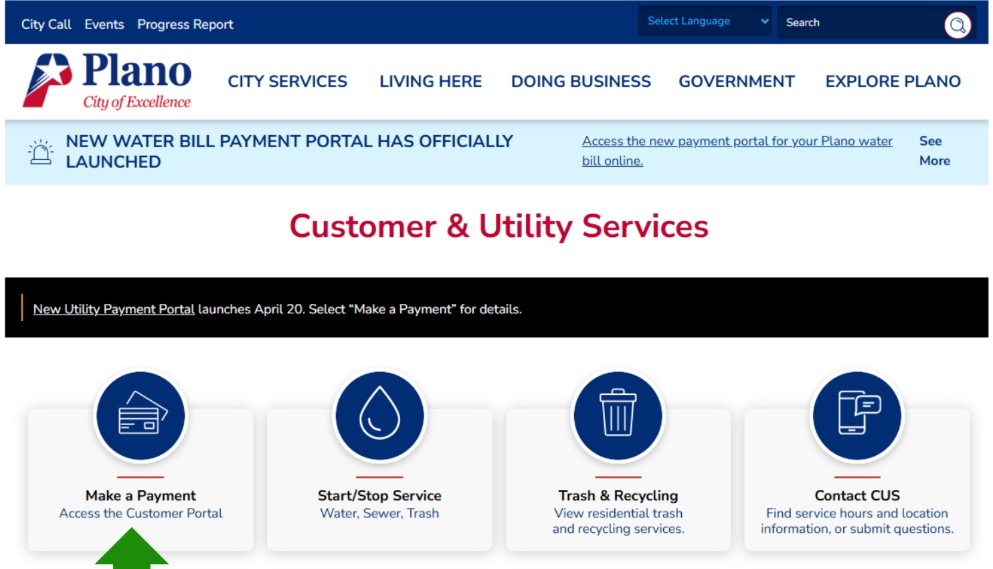
The image below is used as a visual guide for this Plano Gov water bill page. It helps users understand the online payment intent of the page before they choose Quick Pay, portal login, AutoPay or customer service help.
Plano Quick Pay: pay your utility bill without registering
Plano Quick Pay is useful when you only want to pay the utility bill and do not need a full portal account session. The official Quick Pay page says it lets you pay online without registering on the Customer and Utility Services website.
City of Plano customer portal: view bills, track water use and manage account
Use the full Customer & Utility Services portal if you want more than a one-time payment. The portal is the better choice when you need bill history, usage tracking, saved payment methods, paperless billing or AutoPay settings.
| Portal task | Best for | Practical tip |
|---|---|---|
| View bills | Checking current or past bill details | Compare the current bill with previous months before assuming an error. |
| Track water use | Finding high-use patterns or possible leaks | Look for continuous use, overnight use or irrigation spikes. |
| Store payment method | Faster future payments | Confirm the card/bank account is current after any card replacement. |
| Enroll in AutoPay | Avoiding missed due dates | After portal updates, verify AutoPay is still active. |
| Manage account | Billing details, usage, payment method and account support | Call customer service if account status or payment posting is urgent. |
Plano AutoPay and paperless billing: what to check before relying on it
AutoPay is helpful, but only if it is active and connected to a valid payment method. City notices about the new payment portal mean AutoPay users should confirm registration and enrollment status inside the official portal.
Which Plano water bill payment option should you use?
| Your need | Best option | Why |
|---|---|---|
| Pay once quickly | Quick Pay | Good when you do not need bill history or saved payment settings. |
| View bill and usage | Customer portal | Better for tracking water use and reviewing account details. |
| Avoid missed payments | AutoPay | Useful if enrolled correctly and payment method is current. |
| Payment did not post | Call customer service | A representative can help review account and payment status. |
| High bill or possible leak | Portal usage review + customer service | Usage data helps separate real water use from billing confusion. |
Why your Plano water bill may be high
A high Plano water bill can come from irrigation, seasonal watering, a running toilet, outdoor leaks, a broken sprinkler head, pool filling, extra household use, previous balance, rate/fee changes or a payment posting issue.
Start, stop or manage Plano water service
If you are moving in, moving out, changing responsibility, or need service help, start from the official City of Plano Customer & Utility Services resources. Use the portal when available, but call customer service if timing is important.
Plano water bill phone number, address and support details
| Contact item | Official detail | Use it for |
|---|---|---|
| Customer & Utility Services | 972-941-7105 | Account and billing questions, portal issues, payment status and utility billing help. |
| Main City phone | 972-941-7000 | General City of Plano contact and routing. |
| Municipal Center | 1520 K Avenue, Plano, TX 75074 | City office location and in-person reference. |
| Customer support hours | Monday–Friday, non-holidays, 8:30 AM–4:00 PM | Account and billing phone support planning. |
| Municipal Center hours | Monday–Friday, 8:00 AM–5:00 PM | Planning City office visits. |
City of Plano Customer & Utility Services map
The map below points to Plano Municipal Center at 1520 K Avenue, Plano, TX 75074. Use official City of Plano pages for current office access, portal login and billing support details.
Common Plano Gov water bill mistakes to avoid
| Mistake | Why it causes trouble | Better action |
|---|---|---|
| Using the wrong payment site | Third-party sites may delay posting or charge extra fees. | Start from official City of Plano Quick Pay or portal. |
| Assuming AutoPay is active after portal change | AutoPay users may need to re-register or re-enroll. | Log into the official portal and confirm AutoPay status. |
| Not saving confirmation | Harder to prove payment if posting is delayed. | Save receipt, confirmation number or screenshot. |
| Only checking bill amount | High bills may be caused by usage, previous balance, fees or payment timing. | Review usage and bill details in the portal. |
| Waiting to call on urgent issues | Portal payment may not answer account status questions. | Call 972-941-7105 during support hours if payment status is urgent. |
Official Plano Gov water bill resources
Use these official links for final action. This guide explains the process, but live balance, payment posting, portal login, AutoPay status and account decisions must be confirmed on official City of Plano resources.
City of Plano Quick Pay City of Plano Customer & Utility Services portal City of Plano Customer & Utility Services official page City of Plano Pay Bills Online Plano Water Resources City of Plano Customer & Utility Services contact formPlano Gov water bill FAQs
How do I pay my Plano Gov water bill online?
Use the City of Plano Quick Pay page for a one-time payment, or use the Customer & Utility Services portal to view bills, track water use, store a payment method and manage AutoPay.
What is Plano Quick Pay?
Plano Quick Pay is the official City of Plano option for paying a utility bill online without registering on the Customer & Utility Services website.
What is the Plano utility billing phone number?
City of Plano Customer & Utility Services lists account and billing questions at 972-941-7105.
Can I view my Plano water bill online?
Yes. Use the City of Plano Customer & Utility Services portal to access bill and account options. The portal is also used for tracking water use and managing payment settings.
Can I track Plano water use online?
Yes. The City of Plano customer portal describes water-use tracking as one of its customer portal features.
Can I set up AutoPay for a Plano water bill?
Yes. Use the Customer & Utility Services portal to store a payment method and enroll in AutoPay. If the portal has changed, verify whether you must re-register or re-enroll.
What should I do if my Plano water bill payment did not post?
Call 972-941-7105 with your account details, payment date, payment amount, payment method and confirmation number.
Where is City of Plano Customer & Utility Services located?
City of Plano lists the Municipal Center at 1520 K Avenue, Plano, TX 75074.
Why is my Plano water bill high?
Common reasons include irrigation, running toilets, outdoor leaks, pool filling, seasonal use, previous balance, fees, payment timing or real usage increases. Review water use in the customer portal before calling.
Is Water-Department.org the City of Plano?
No. Water-Department.org is an independent guide and is not the City of Plano. Always verify payment, balance, AutoPay, portal access and account-specific status on official City of Plano resources.
Last editorial check: June 2026. Official payment portals, phone numbers, office hours, payment rules, AutoPay requirements and account procedures can change. Confirm current details directly with City of Plano Customer & Utility Services before paying, enrolling in AutoPay, visiting an office or making account decisions.
Pay Smarter, Check High Bills, Start Service, Avoid Shutoff and Find Official Water Department Links
Use this free tool before paying a water bill, setting up autopay, starting or stopping service, checking a high bill, requesting leak help, or looking for the official water department portal. It gives practical next steps without collecting your account number or personal details.
What water bill or service problem do you need to solve?
Choose your situation. The tool will suggest the safest next step, what to prepare, and which official page to check first.
Start from the official water department, city, county or utility website before entering account details. Avoid random payment ads and look-alike bill pay sites.
Before paying a very unusual bill, check meter reads, toilet leaks, irrigation use, estimated bills, late fees, and whether your utility offers a leak adjustment.
Water Bill Payment Route Helper
Choose how you want to pay. The tool will tell you what to prepare and the safest payment path.
High Water Bill Checker
Compare your normal bill with the new bill and get a practical investigation path before calling customer service.
Leak Check and Adjustment Checklist
Use this before requesting a leak adjustment, disputing a bill, or calling the water department about high usage.
Start, Stop or Transfer Water Service Helper
Use this before moving, opening a new account, closing an old account, or transferring service to another address.
Past Due, Shutoff and Reconnection Helper
Use this if your account is late, disconnected, at risk of shutoff, or you need a payment plan or assistance program.
Simple Water Usage Cost Estimator
Estimate a rough bill from base charge, usage units, rate per unit, sewer charge, stormwater fee and service fees. Official tiered rates may be different.
Official Water Department Resource Finder
Enter city/utility and state to create safe searches for the official water bill portal, phone number, outage page, assistance, start service, leak adjustment, and Water-Department.org guide.
Water Department vs Payment Processor
- Water department: account help, service start/stop, leaks, repairs, shutoff, assistance.
- Payment processor: card/eCheck payment screen, payment fee, confirmation number, posting time.
Best sitewide placement
Add this tool after the main payment section or before FAQs. It helps users solve the next problem after reading the article.
Important safety note
This tool gives educational guidance only. Always confirm payment portals, phone numbers, account balance, assistance rules and reconnection steps with the official water department or utility.