
Lufkin Click2Gov Utility Payment, Fees, Phone Help, City Hall Payment and Water Leak Support
City of Lufkin water customers can pay online through Click2Gov, check debit/credit card and eCheck fees, call Utility Collections, pay at City Hall, use the drive-thru, ask about high bills or adjustments, and contact Water Distribution for water service issues. This guide gives you the official links, fees, phone numbers and practical steps in one place.
How to pay a City of Lufkin water bill
To pay a City of Lufkin water bill online, start from the official Pay Bills Online page or open the Click2Gov Utility Billing portal. For billing/account help, call Utility Collections at 936-633-0220. For Water Distribution questions, call 936-633-0230. For after-hours or weekend water emergencies, call 936-633-0356.
What do you need to do today?
Lufkin water customers usually need one of these routes: online payment, fee check, Utility Collections phone help, City Hall payment, drive-thru payment, high bill help or water leak reporting.
Official City of Lufkin water bill payment and service links
Use these official City of Lufkin links for online utility billing, Click2Gov payment, Utility Collections, City Hall payment, Water Distribution, high-bill questions and water leak reporting.
City of Lufkin water bill Click2Gov payment screenshot guide
The screenshot below helps users recognize the official City of Lufkin water bill payment and Utility Collections options before using the Click2Gov portal, fee information, phone support, high-bill help or water leak reporting links.
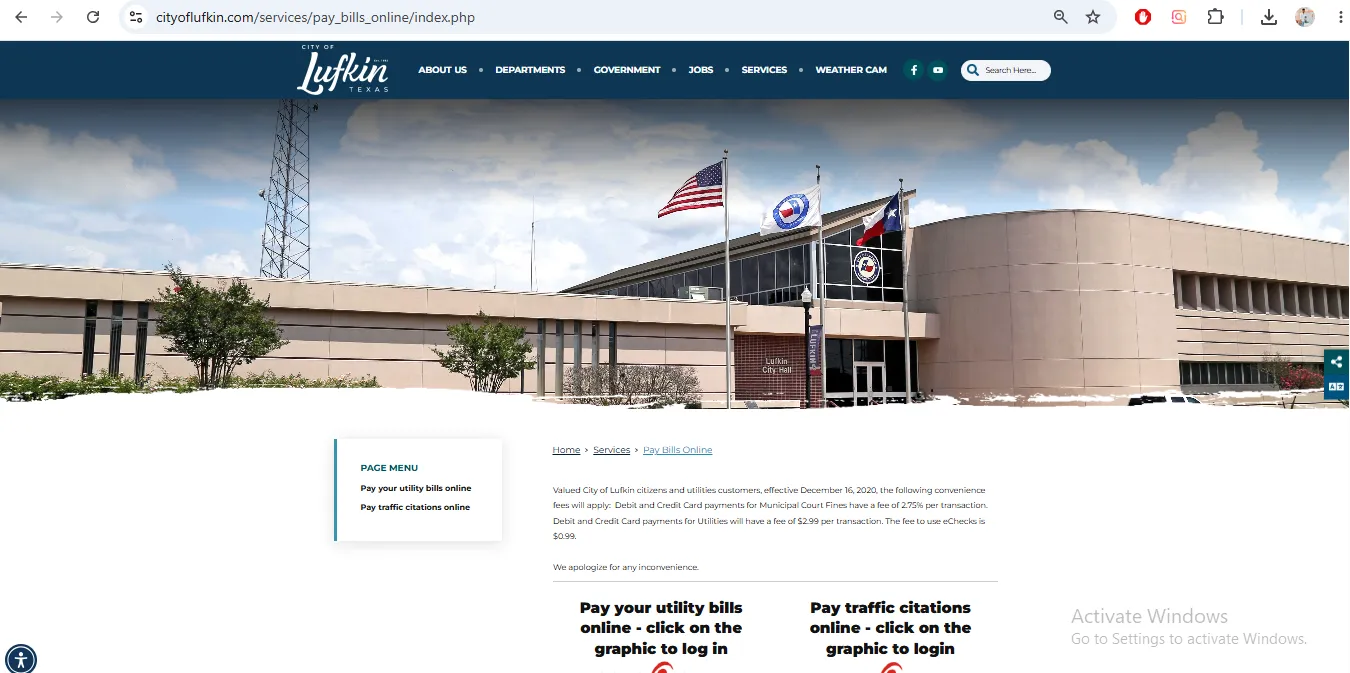
Image note: This image is used only as a user-help visual reference near the official action section. It is not payment proof, account proof, a live portal, or an official endorsement.
How to pay your City of Lufkin water bill online
Click2Gov Utility Billing is the official online utility billing route for City of Lufkin customers. It provides online account views and payment options.
City of Lufkin water bill payment fees
| Payment method | Official fee note | Practical action |
|---|---|---|
| Debit card / credit card utility payment | $2.99 transaction fee for utility debit and credit card payments. | Review final fee screen before approving payment. |
| eCheck utility payment | $0.99 fee to use eChecks. | Compare card fee vs eCheck fee before submitting. |
| In-person City Hall payment | Water and sewer accounts can be paid in person at City Hall. | Bring bill, account number, payment method and ID if needed. |
| Drive-thru payment | Drive-thru payment is listed at City Hall during posted hours. | Use when you want a local payment option without going inside. |
City of Lufkin Utility Collections phone, City Hall payment and drive-thru
Utility Collections is the main billing/account route for City of Lufkin water and sewer accounts.
| Need | Official detail | Use it for |
|---|---|---|
| Utility Collections phone | 936-633-0220 | Water bill payment questions, account questions and Utility Collections help. |
| In-person payment | City Hall, 300 East Shepherd, Room 126; 8:00 AM to 5:00 PM. | Paying water and sewer accounts at City Hall. |
| Drive-thru payment | City Hall drive-thru; 7:30 AM to 5:00 PM. | Local payment without entering the building. |
| Online account view/payment | Click2Gov Utility Billing. | Viewing utility account information and paying online. |
| High bill or adjustment route | Water Department FAQ directs high bill/adjustment questions to 936-633-0230. | Substantial bill increase, high usage or adjustment questions. |
City of Lufkin high water bill, adjustment and leak help
A sudden high water bill can happen because of leaks, meter/account issues, irrigation, extra usage or a running fixture. Fix possible water loss quickly before the next bill grows.
Water Distribution phone number and after-hours emergency help
| Issue | Call / use | Best action |
|---|---|---|
| Water Distribution question | 936-633-0230 | Use for Water Distribution department help during normal routing. |
| High water bill or adjustment question | 936-633-0230 | The Water Department FAQ directs high bill/adjustment questions to this number. |
| After 5 PM water emergency | 936-633-0356 | Use for urgent water problems after 5 PM. |
| Weekend water emergency | 936-633-0356 | Use for weekend emergency water distribution concerns. |
| Immediate safety danger | 911 | Call 911 first if there is danger to life, health or safety. |
City of Lufkin water bill phone number, address and map
| Contact item | Official detail | Use it for |
|---|---|---|
| Utility Collections | 936-633-0220 | Billing, payment and utility account questions. |
| Water Distribution | 936-633-0230 | Water distribution questions and high bill/adjustment routing listed by FAQ. |
| After-hours/weekend emergency | 936-633-0356 | Urgent water problems after 5 PM or on weekends. |
| City Hall payment | 300 E. Shepherd Avenue, Room 126, Lufkin, TX 75901 | In-person water and sewer account payment. |
| In-person payment hours | 8:00 AM to 5:00 PM | City Hall payment counter. |
| Drive-thru payment hours | 7:30 AM to 5:00 PM | Drive-thru payment at City Hall. |
Map shows Lufkin City Hall at 300 E. Shepherd Avenue, Lufkin, TX 75901. Bring your current water bill, account number, payment confirmation, service address and any leak/high-bill documents for account-specific help.
Common City of Lufkin water bill mistakes
| Mistake | Why it creates trouble | Better action |
|---|---|---|
| Using unofficial payment links | Payment may be delayed, misdirected or matched to the wrong account. | Start from cityoflufkin.com or click2gov.cityoflufkin.com. |
| Starting payment without current bill | Online utility billing may require exact account information. | Keep the latest water bill open before starting payment. |
| Ignoring card/eCheck fees | Different payment methods have different transaction fees. | Compare debit/credit card fee and eCheck fee before submitting. |
| Waiting on a high water bill | A leak can continue wasting water and raise the next bill also. | Check fixtures quickly and call the City for guidance. |
| Calling billing for after-hours emergency only | Urgent water problems after normal hours need Water Distribution emergency routing. | Use 936-633-0356 after 5 PM and on weekends. |
| Not saving payment proof | Follow-up is difficult if the payment does not post correctly. | Save confirmation number, amount, date and screenshot. |
Official sources for City of Lufkin water bill customers
| Official resource | Use it for | Open |
|---|---|---|
| Pay Bills Online | Official online payment starting point and utility payment fee notes. | Open payment page |
| Click2Gov Utility Billing | Online utility account views and payment options. | Open Click2Gov |
| Utility Collections | Billing, utility account and payment department information. | Open Utility Collections |
| Utility Collections Services | City Hall payment, drive-thru payment and service details. | Open services |
| Water Distribution Department | Water Distribution phone number and emergency after-hours/weekend contact. | Open Water Distribution |
| Water Department FAQs | High water bill and adjustment phone guidance. | Open water FAQs |
| Report a Problem | Reporting water leaks or other city service problems through the City site. | Open report page |
| City Contact Directory | Verifying department phone numbers and city contact routes. | Open contact directory |
City of Lufkin water bill FAQs
How do I pay my City of Lufkin water bill online?
Use the official City of Lufkin Pay Bills Online page or the Click2Gov Utility Billing portal. Keep your current water bill ready before starting online payment.
What is the official Lufkin utility payment portal?
The official online utility billing portal is Click2Gov Utility Billing at click2gov.cityoflufkin.com. It provides online utility account views and payment options.
What is the City of Lufkin Utility Collections phone number?
Utility Collections is listed by the City of Lufkin at 936-633-0220.
What fee does Lufkin charge for utility card payments?
The City payment page says debit and credit card payments for utilities have a $2.99 transaction fee.
What fee does Lufkin charge for eCheck utility payments?
The City payment page says the fee to use eChecks is $0.99.
Can I pay my Lufkin water bill in person?
Yes. Utility Collections Services says water and sewer accounts can be paid in person at City Hall, 300 East Shepherd, Room 126, between 8:00 AM and 5:00 PM.
Does Lufkin have drive-thru utility payment?
Yes. Utility Collections Services says water and sewer accounts can be paid through the drive-thru between 7:30 AM and 5:00 PM at City Hall.
Who do I call if my Lufkin water bill is high?
The Water Department FAQ directs high water bill or adjustment questions to 936-633-0230. For billing/account questions, Utility Collections is listed at 936-633-0220.
What should I check before calling about a high bill?
Check toilets, faucets, outdoor hose bibs, irrigation, wet spots near the meter, recent extra usage and any recent plumbing repairs. Save repair receipts and photos if available.
What is the Lufkin Water Distribution Department phone number?
The Water Distribution Department lists 936-633-0230 as its phone number.
What is the City of Lufkin after-hours water emergency number?
The Water Distribution Department lists 936-633-0356 as the emergency number after 5 PM and on weekends.
Where is Lufkin City Hall for utility payment?
City Hall is at 300 E. Shepherd Avenue, Lufkin, TX 75901. Utility Collections Services references Room 126 for water and sewer account payments.
Can I report a water leak online?
The City has a Report a Problem page, and the Water Utilities page references online reporting forms for water leaks or water quality concerns. Use the official City site for final reporting.
Should I call 911 for a water leak?
Use the City’s water emergency number for water distribution issues. Call 911 first only if there is immediate danger to life, health or safety.
Is Water-Department.org the official City of Lufkin website?
No. Water-Department.org is an independent guide. Official payments, billing decisions, fees, account help, leak reporting and emergency service must be handled through City of Lufkin official resources.
Last editorial check: June 2026. Payment links, phone numbers, City Hall hours, drive-thru hours, fee amounts, high-bill routing and water emergency contacts can change. Confirm final details directly with City of Lufkin, Utility Collections, Click2Gov Utility Billing or Water Distribution.
Pay Smarter, Check High Bills, Start Service, Avoid Shutoff and Find Official Water Department Links
Use this free tool before paying a water bill, setting up autopay, starting or stopping service, checking a high bill, requesting leak help, or looking for the official water department portal. It gives practical next steps without collecting your account number or personal details.
What water bill or service problem do you need to solve?
Choose your situation. The tool will suggest the safest next step, what to prepare, and which official page to check first.
Start from the official water department, city, county or utility website before entering account details. Avoid random payment ads and look-alike bill pay sites.
Before paying a very unusual bill, check meter reads, toilet leaks, irrigation use, estimated bills, late fees, and whether your utility offers a leak adjustment.
Water Bill Payment Route Helper
Choose how you want to pay. The tool will tell you what to prepare and the safest payment path.
High Water Bill Checker
Compare your normal bill with the new bill and get a practical investigation path before calling customer service.
Leak Check and Adjustment Checklist
Use this before requesting a leak adjustment, disputing a bill, or calling the water department about high usage.
Start, Stop or Transfer Water Service Helper
Use this before moving, opening a new account, closing an old account, or transferring service to another address.
Past Due, Shutoff and Reconnection Helper
Use this if your account is late, disconnected, at risk of shutoff, or you need a payment plan or assistance program.
Simple Water Usage Cost Estimator
Estimate a rough bill from base charge, usage units, rate per unit, sewer charge, stormwater fee and service fees. Official tiered rates may be different.
Official Water Department Resource Finder
Enter city/utility and state to create safe searches for the official water bill portal, phone number, outage page, assistance, start service, leak adjustment, and Water-Department.org guide.
Water Department vs Payment Processor
- Water department: account help, service start/stop, leaks, repairs, shutoff, assistance.
- Payment processor: card/eCheck payment screen, payment fee, confirmation number, posting time.
Best sitewide placement
Add this tool after the main payment section or before FAQs. It helps users solve the next problem after reading the article.
Important safety note
This tool gives educational guidance only. Always confirm payment portals, phone numbers, account balance, assistance rules and reconnection steps with the official water department or utility.