
Robeson County Water Bill Pay: lookup, online payment, phone payment and due date help
Need to pay or look up a Robeson County water bill? This guide gives you the official payment route, Robeson County Water Department phone numbers, Account # and CID # tips, due-date cycles, cutoff timing, EyeOnWater usage lookup help, drop box details and what to do if your bill is high or past due.
For online and phone payment, keep your latest water bill ready. Robeson County says customers should have the Account # and CID #, and the office verifies the account name and mailing address for payment accuracy.
Quick answer: Robeson County water bill pay and lookup
To pay a Robeson County water bill online, use the official county-linked payment service and enter your account details. To look up usage, register for EyeOnWater using your ZIP code, account number, CID number and email address. For billing or service questions, call Robeson County Water Department at 910-671-3478.
The most important thing is to use the right number for the right task: 1-866-249-0705 for phone payment, 910-671-3478 for account help, and 910-671-3485 only for after-hour water main break emergencies.
On this Robeson County water bill pay page
Robeson County water bill pay screenshot guide
The screenshot below helps you recognize the official Robeson County Water Department page and the main customer buttons. For this bill-pay page, the most important options are Pay Water Bill Online and EyeOnWater Signup Information.
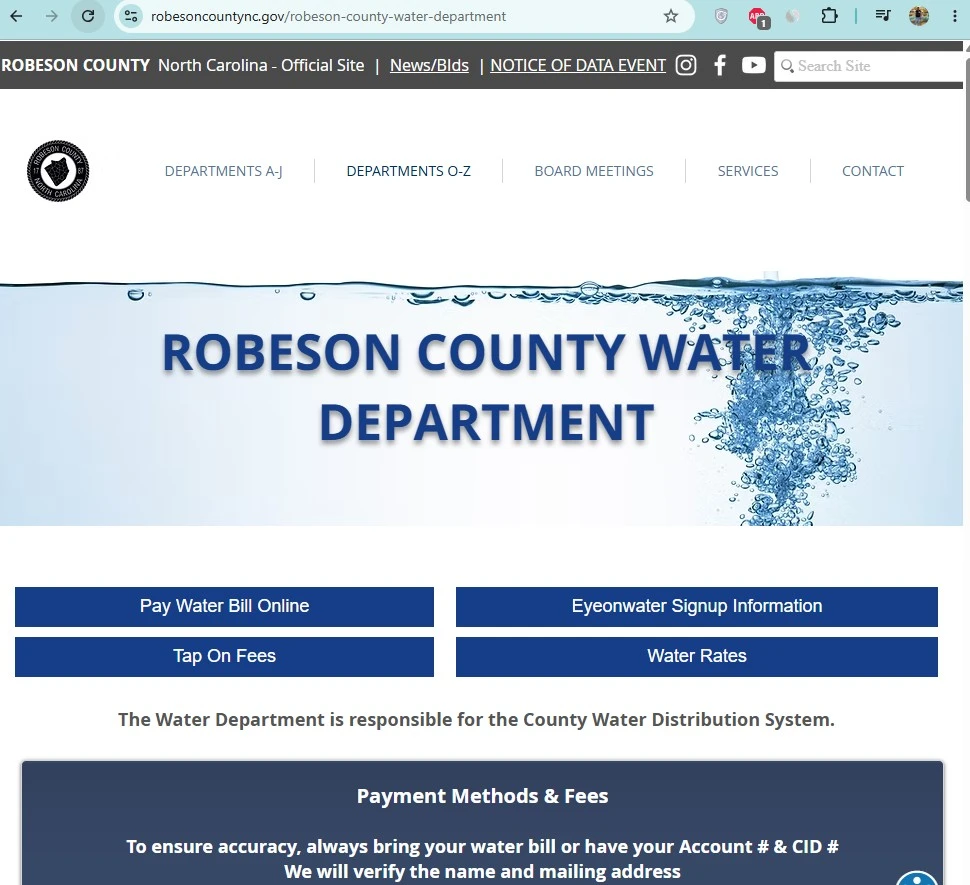
How to pay Robeson County water bill online
Online payment is usually the fastest option when your account is current and you have the required account details. If your account is near cutoff, call the Water Department after payment to confirm account status.
Robeson County water bill lookup: what you can check online
Many users search for “Robeson County water bill lookup” because they want to see a balance, confirm the account, check usage, or find payment status. The safest starting point is your latest water bill because online payment and account help depend on the Account # and CID #.
| Lookup need | Where to start | What you need |
|---|---|---|
| Pay current balance | Official online payment service | Account # and CID # |
| Check usage pattern | EyeOnWater | ZIP code, account number, CID number and email |
| Confirm past-due status | Call Water Department | Bill, Account #, CID # and payment confirmation if paid |
| Verify payment posted | Call 910-671-3478 | Confirmation number, payment date and account details |
| Check possible leak | EyeOnWater usage history | Login credentials and recent usage pattern |
Robeson County water bill phone payment
If you do not want to pay online, Robeson County lists phone payment at 1-866-249-0705. Keep your Account # and CID # ready before calling.
Robeson County water bill payment methods compared
| Payment method | Best for | What to remember |
|---|---|---|
| Online payment | Fast regular bill payment | Must have Account # and CID #. Save confirmation. |
| Phone payment | Paying without using website | Call 1-866-249-0705 with Account # and CID #. |
| Office payment | Customers needing in-person help | Office is at 330 Sanchez Road, Lumberton, NC 28358. |
| Drop box | Check or money order after hours | Do not leave cash. Include Account # and CID #. |
| Automatic bank draft | Avoiding missed monthly due dates | Use official form and confirm when the draft starts. |
Robeson County water bill due dates and cutoff timing
Robeson County lists three monthly due-date cycles. Your bill should show which cycle applies to your account.
| Cycle | Due date | Customer action |
|---|---|---|
| 1st Cycle | Due 5th of each month before 5:00 PM | Pay before 5 PM and save proof. |
| 2nd Cycle | Due 15th of each month before 5:00 PM | Pay early if the 15th is busy or near a holiday. |
| 3rd Cycle | Due 25th of each month before 5:00 PM | Do not wait until after 5 PM. |
| Weekend or holiday | Due date moves to next business day | Confirm with bill or office. |
| Cutoff timing | 5 calendar days after each bill is due | Call 910-671-3478 if behind. |
What to do if your Robeson County water bill is past due
If your bill is already late, the goal is not only to pay. You also need to confirm whether the account is in late-fee, cutoff or reconnection status.
EyeOnWater: Robeson County water usage lookup and leak alerts
EyeOnWater is useful when you want to understand water usage, not just pay the bill. It can help identify leaks, overnight usage, irrigation spikes and unusual usage patterns.
High Robeson County water bill checklist
If your Robeson County water bill looks higher than normal, check usage before assuming the amount is wrong. A hidden leak can create a high bill quickly.
Robeson County Water Department contact details for bill pay help
| Contact item | Official detail | Use it for |
|---|---|---|
| Customer service | 910-671-3478 | Billing, lookup, account, disconnection, service and payment questions. |
| Phone payment | 1-866-249-0705 | Paying by phone with Account # and CID #. |
| After-hour main break | 910-671-3485 | After-hour emergencies due to water main breaks only. |
| Physical address | 330 Sanchez Road, Lumberton, NC 28358 | Office visit, drop box and account documents. |
| Mailing address | P.O. Box 1769, Lumberton, NC 28359 | Mailed forms and correspondence. |
| Fax | 910-608-3944 | Documents where fax is accepted. |
Robeson County Water Department payment office map
Use the map below for the Water Department office and drop-box location at 330 Sanchez Road, Lumberton, NC 28358. Bring your bill or include Account # and CID # on check or money order.
Common Robeson County water bill pay mistakes
| Mistake | Why it matters | Better action |
|---|---|---|
| Searching without CID # | Online and phone payment may require both Account # and CID #. | Keep the latest bill open before payment. |
| Waiting until after 5 PM | Late fees may apply after the due-date deadline. | Pay before 5 PM and save proof. |
| Relying only on payment if already late | Payment may not answer cutoff or reconnection timing. | Call 910-671-3478 with confirmation. |
| Leaving cash in drop box | The county says it is not responsible for cash in the drop box. | Use check or money order with account details. |
| Ignoring usage lookup | Leaks may continue until the next bill. | Use EyeOnWater to monitor unusual usage. |
Official Robeson County water bill pay resources
Use these official links for final action. This guide explains the process, but your balance, due date, cutoff status and payment posting must be confirmed through official resources.
Official Robeson County water bill online payment Robeson County Water Department official page Robeson County Online Services Robeson County EyeOnWater information Robeson County Public Utilities and water reportsRobeson County water bill pay FAQs
How do I pay my Robeson County water bill online?
Use the official Pay Water Bill Online link from Robeson County Water Department. Keep your Account # and CID # ready because the online payment service requires account details.
How do I look up my Robeson County water bill?
Start with your latest water bill because it shows the Account # and CID # needed for payment. For usage lookup and leak alerts, register for EyeOnWater using ZIP code, account number, CID number and email address.
What is the Robeson County water bill phone payment number?
Robeson County lists phone payment at 1-866-249-0705. Have your Account # and CID # ready before calling.
What is the Robeson County Water Department phone number?
Call 910-671-3478 for account questions, water service questions, billing questions, disconnection questions, new accounts, transfers and general customer service.
When is my Robeson County water bill due?
Robeson County lists 1st Cycle due on the 5th, 2nd Cycle due on the 15th and 3rd Cycle due on the 25th before 5:00 PM. If the date falls on a weekend or holiday, the due date moves to the next business day.
When can Robeson County water service be cut off?
Robeson County states that cutoff for each cycle is 5 calendar days after each bill is due.
What should I do if I paid but still got a cutoff notice?
Call 910-671-3478 with your Account #, CID #, payment date, payment method and confirmation number. Ask the office to confirm whether the payment posted to the correct account.
Can I track Robeson County water usage online?
Yes. Robeson County customers can use EyeOnWater for real-time water usage tracking, leak alerts and account management from a computer, tablet or smartphone.
What do I need for EyeOnWater registration?
You need ZIP code, account number, CID number and email address. Robeson County says to enter the CID number after the dash exactly as shown.
Where is the Robeson County Water Department office?
The Water Department is located at 330 Sanchez Road, Lumberton, NC 28358. The mailing address is P.O. Box 1769, Lumberton, NC 28359.
Can I use the drop box for Robeson County water bill payment?
Yes. The drop box is beside the drive-thru at 330 Sanchez Road. Do not leave cash. Use check or money order and include your water bill or Account # and CID #.
What is the after-hour emergency number?
For after-hour emergencies due to water main breaks only, call 910-671-3485. This number is for emergencies only.
Last editorial check: June 2026. Official payment links, phone numbers, cutoff rules, due dates, forms and account procedures can change. Confirm current details directly with Robeson County Water Department before paying, visiting, filing forms or reporting an emergency.
Pay Smarter, Check High Bills, Start Service, Avoid Shutoff and Find Official Water Department Links
Use this free tool before paying a water bill, setting up autopay, starting or stopping service, checking a high bill, requesting leak help, or looking for the official water department portal. It gives practical next steps without collecting your account number or personal details.
What water bill or service problem do you need to solve?
Choose your situation. The tool will suggest the safest next step, what to prepare, and which official page to check first.
Start from the official water department, city, county or utility website before entering account details. Avoid random payment ads and look-alike bill pay sites.
Before paying a very unusual bill, check meter reads, toilet leaks, irrigation use, estimated bills, late fees, and whether your utility offers a leak adjustment.
Water Bill Payment Route Helper
Choose how you want to pay. The tool will tell you what to prepare and the safest payment path.
High Water Bill Checker
Compare your normal bill with the new bill and get a practical investigation path before calling customer service.
Leak Check and Adjustment Checklist
Use this before requesting a leak adjustment, disputing a bill, or calling the water department about high usage.
Start, Stop or Transfer Water Service Helper
Use this before moving, opening a new account, closing an old account, or transferring service to another address.
Past Due, Shutoff and Reconnection Helper
Use this if your account is late, disconnected, at risk of shutoff, or you need a payment plan or assistance program.
Simple Water Usage Cost Estimator
Estimate a rough bill from base charge, usage units, rate per unit, sewer charge, stormwater fee and service fees. Official tiered rates may be different.
Official Water Department Resource Finder
Enter city/utility and state to create safe searches for the official water bill portal, phone number, outage page, assistance, start service, leak adjustment, and Water-Department.org guide.
Water Department vs Payment Processor
- Water department: account help, service start/stop, leaks, repairs, shutoff, assistance.
- Payment processor: card/eCheck payment screen, payment fee, confirmation number, posting time.
Best sitewide placement
Add this tool after the main payment section or before FAQs. It helps users solve the next problem after reading the article.
Important safety note
This tool gives educational guidance only. Always confirm payment portals, phone numbers, account balance, assistance rules and reconnection steps with the official water department or utility.