
Aurora Water Portal Login, Reconnect Request, Assistance and Leak Alert Help
Aurora Water customers can pay online, use the customer portal, call billing, request reconnect after shutoff, apply for Aurora Water Cares assistance, monitor water use and set continuous-flow alerts. This guide keeps the official links, phone numbers, reconnect steps, assistance rules, fee notes and leak-help steps in one simple place.
How to pay an Aurora Water bill or request reconnect
To pay an Aurora Water bill, start from the official Billing and Rates page or the Aurora Water customer portal. For billing questions, call 303-739-7388. If service was discontinued and you already paid the full past-due balance, call 303-739-7388 or log in and complete a Reconnect Request. For after-hours emergencies and reconnects, call 303-739-6772.
What do you need to do today?
Aurora Water has different routes for normal bill payment, portal login, reconnects, after-hours help, assistance, leak alerts, EyeOnWater and billing-fee questions.
Official Aurora Water bill payment and service links
Use these official City of Aurora and Aurora Water links for online payment, portal login, reconnect request, customer service, bill assistance, billing fees, leak alerts and EyeOnWater.
Aurora Water bill portal login and reconnect screenshot guide
The screenshot below helps users recognize the official Aurora Water bill payment and service options before using the online portal, phone payment, reconnect request, Aurora Water Cares assistance or leak help links.
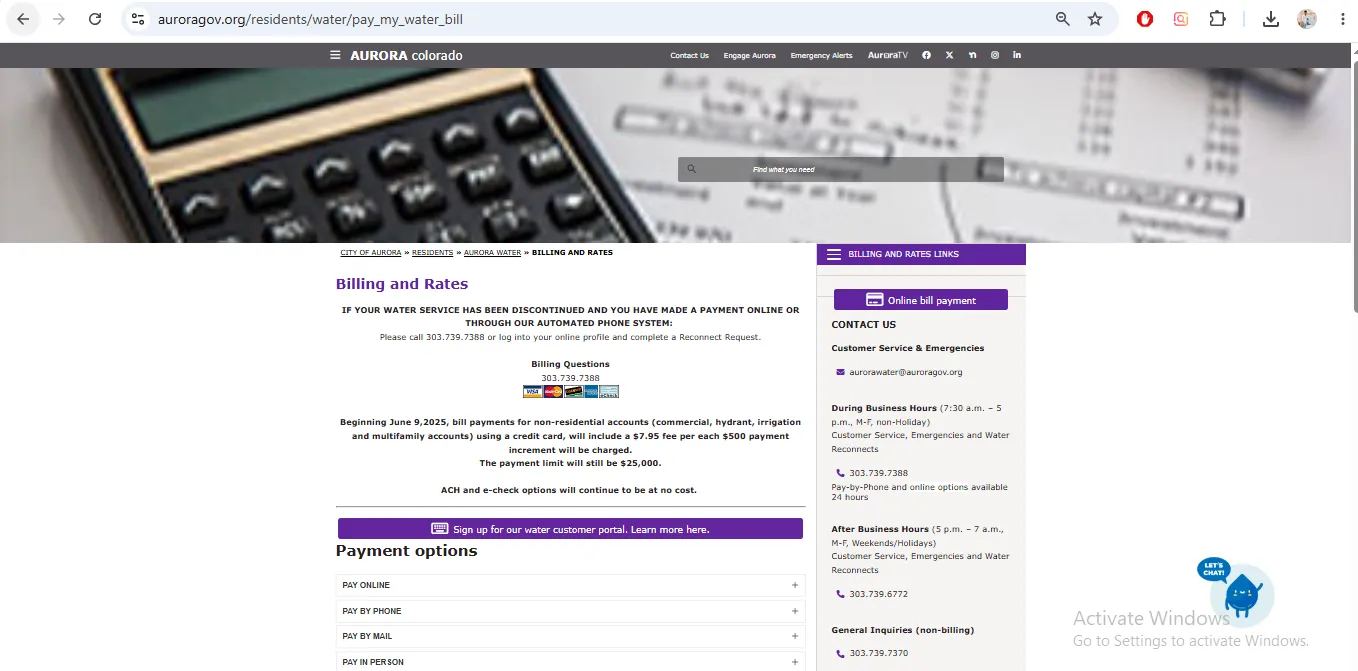
Image note: This image is used only as a user-help visual reference near the official action section. It is not payment proof, account proof, a live portal, or an official endorsement.
How to pay your Aurora Water bill online
The Aurora Water customer portal is the main online route for payments, account management, forms, payment history, statement history and water-use information.
What the Aurora Water customer portal can do
Manage one or multiple accounts
Add, view and manage multiple accounts with one sign-in.
Payment and statement history
View and download payment and statement history.
Water-use graphs
View water consumption graphs and usage summaries to spot changes.
| Portal feature | Why it helps | Best action |
|---|---|---|
| Online forms | Submit requests and receive response emails. | Use portal forms when you need written follow-up. |
| Aurora Water Cares application | Apply online and upload documents. | Use this route if you are past due and need assistance. |
| Water consumption graph | Shows usage changes over selected periods. | Use it before calling about a high bill. |
| Contact request | Creates an electronic request for contact. | Use when the issue is not urgent. |
Aurora Water phone number for billing, reconnects and emergencies
| Need | Official number | When to use it |
|---|---|---|
| Billing, customer service, business-hours emergencies and reconnects | 303-739-7388 | During business hours, 7:30 AM-5 PM, Monday-Friday, non-holiday. |
| After-hours emergencies and reconnects | 303-739-6772 | After business hours, weekends and holidays for emergencies or reconnects. |
| General Aurora Water inquiries | 303-739-7370 | General water department questions not tied to billing or emergency response. |
| Water conservation | 303-739-7195 | Water conservation programs and related questions. |
| Immediate danger | 911 | Call 911 first for life, health or safety emergencies. |
Aurora Water reconnect after discontinued service
If your water service was discontinued for delinquency, do not stop after making the payment. Complete the reconnect step through Aurora Water.
Aurora Water billing fees and payment fee notes
Payment and service fees can change. Always confirm current fees on the official Billing and Rates and Water Billing Information and Fees pages before paying.
| Fee or rule | Official note | Practical action |
|---|---|---|
| Online / IVR residential credit-card payment | Aurora lists a payment processing fee for residential credit-card water bill transactions. | Review the payment screen before submitting. |
| Non-residential credit-card payment | Aurora lists a fee per $500 payment increment for non-residential credit-card payments beginning June 9, 2025. | Commercial, hydrant, irrigation and multifamily accounts should review fee impact carefully. |
| ACH and e-check | Aurora says ACH and e-check options continue to be at no cost. | Consider ACH/e-check if you want to avoid card processing fees. |
| Delinquent shutoff | Aurora says delinquent shutoff can occur when an account balance is 40 days past due. | Call billing before the account reaches shutoff stage. |
| Late fee | Aurora lists a late fee as a percentage of past-due amount after the due date grace period. | Pay before the due date or ask about assistance/payment options early. |
Aurora Water Cares assistance for past-due customers
Aurora Water Cares helps eligible customers who are past due on their water bills. Assistance is paid directly to the utility on the customer’s behalf.
Up to $400
Aurora Water Cares can provide up to $400 in assistance.
Once per 12 months
The program is limited to once per 12-month period.
Four awards
Aurora lists a four-lifetime-award limit.
Aurora Water leak alerts, continuous-flow notices and bill adjustment help
Aurora Water’s AMI and customer portal tools can help customers see water-use data and continuous-flow alerts. Continuous usage for 24 hours can indicate a leak or something left on.
Use EyeOnWater to monitor Aurora water use
EyeOnWater is useful when you want deeper water-use monitoring and continuous-flow alerts connected to the advanced meter upgrade.
| EyeOnWater step | What to do | Why it matters |
|---|---|---|
| Download app | Use the Apple App Store or Google Play Store. | Mobile access makes it easier to watch usage changes. |
| Enter account number | Use your Aurora Water account number. | The portal must match your meter/account record. |
| Verify location | Enter service location or billing ZIP code. | This helps verify the account correctly. |
| Set alerts | Enable continuous-flow alerts where available. | Alerts can warn you about leaks before the next bill arrives. |
Aurora Water phone, office and service contact details
| Contact item | Official detail | Use it for |
|---|---|---|
| Billing / customer service / business-hours reconnect | 303-739-7388 | Billing questions, reconnects, emergencies and customer service during business hours. |
| After-hours emergencies / reconnects | 303-739-6772 | After business hours, weekends and holidays. |
| Aurora Water address | Daniel P. Mikesell Water Operations Facility, 26791 E. Quincy Ave., Aurora, CO 80016 | Aurora Water office reference and billing office drop-off/mail routes when applicable. |
| Aurora Municipal Center | 15151 E. Alameda Parkway, Aurora, CO 80012 | Access Aurora / assistance document drop-off route listed by Aurora Water Cares. |
| General Aurora Water inquiries | 303-739-7370 | General water department questions not handled by billing. |
Map shows Aurora Water at the Daniel P. Mikesell Water Operations Facility, 26791 E. Quincy Ave., Aurora, CO 80016. Bring your account number, service address, payment proof, reconnect confirmation and assistance/leak documents for account-specific help.
Common Aurora Water bill payment and reconnect mistakes
| Mistake | Why it causes trouble | Better action |
|---|---|---|
| Using unofficial payment links | Payment or account data can be delayed, misdirected or unsafe. | Start from auroragov.org or myaccount.aurorawater.org. |
| Paying past-due balance but not requesting reconnect | Service restoration may require a separate reconnect request step. | Call 303-739-7388 or complete Reconnect Request after payment. |
| Calling the wrong number after hours | Business-hours billing number may not be the after-hours route. | Use 303-739-6772 for after-hours emergencies and reconnects. |
| Ignoring continuous-flow alerts | A leak can run for days and increase the bill quickly. | Check indoor/outdoor fixtures and repair quickly. |
| Waiting too long to apply for assistance | Past-due balances can reach shutoff and reconnect stages. | Use Aurora Water Cares early if you qualify. |
| Assuming card payment is cheapest | Card payments can have processing fees. | Compare ACH/e-check options before paying. |
Official Aurora Water resources used in this guide
| Official resource | Use it for | Open |
|---|---|---|
| Billing and Rates | Bill payment, payment fee notes, billing phone, reconnect notice and payment resources. | Open Billing and Rates |
| Water Customer Portal | SpryEngage portal features, account tools, forms, history and usage graphs. | Open portal guide |
| Aurora Water Login | Online profile, payment, forms and reconnect request access. | Open login |
| Aurora Water Cares | Bill assistance amount, eligibility process, application routes and document submission. | Open assistance page |
| Water Alerts / Leak Check | Continuous-flow alerts, leak check steps, indoor/outdoor assessments and leak help. | Open leak alerts |
| Water Billing Information and Fees | Delinquent shutoff, reconnect after shutoff, service fees, late fees and reconnect details. | Open billing fees |
| EyeOnWater | Water-use monitoring, AMI information and continuous-flow alerts. | Open EyeOnWater |
| Aurora Water | Main department phone numbers, after-hours emergency/reconnect number and Aurora Water address. | Open Aurora Water |
Aurora Water bill FAQs
How do I pay my Aurora Water bill online?
Use the official City of Aurora Billing and Rates page or the Aurora Water customer portal at myaccount.aurorawater.org. The portal lets you manage payments, forms, history and water usage.
What is the Aurora Water billing phone number?
Call Aurora Water billing and customer service at 303-739-7388.
What are Aurora Water business hours?
Aurora Water lists business-hours customer service and reconnect support from 7:30 AM to 5 PM, Monday through Friday, non-holiday.
What number do I call after hours?
For after-hours emergencies and water reconnects, Aurora Water lists 303-739-6772.
What should I do if my Aurora water service was discontinued?
After paying the full past-due balance, call 303-739-7388 or log in to your online profile and complete a Reconnect Request. After hours, use 303-739-6772.
When can Aurora Water shut off a delinquent account?
Aurora Water billing information says delinquent shutoff can occur when an account balance is 40 days past due, and fees may be incurred.
Does Aurora Water charge payment processing fees?
Aurora lists payment processing fees for certain online and IVR credit-card water bill payments. ACH and e-check options continue to be at no cost according to the Billing and Rates page.
What is the Aurora Water customer portal?
The portal is Aurora Water’s online account system. It supports forms, account updates, multiple accounts, payment and statement history, water consumption graphs, usage summaries and contact requests.
Can I apply for Aurora Water Cares through the portal?
Yes. Aurora Water says customers can apply for Aurora Water Cares through SpryEngage / MyAccount and upload documents.
How much assistance does Aurora Water Cares provide?
Aurora Water says Aurora Water Cares helps past-due customers with up to $400 once per 12 months, with a four-lifetime-award limit.
What documents may be needed for Aurora Water Cares?
Aurora’s page mentions income verification documents, a copy of photo ID and a recent water bill for non-portal/printable application routes. Check the current application instructions before submitting.
Does Aurora Water have leak alerts?
Yes. Aurora Water’s portal can send continuous-flow alerts when a meter records continuous usage for at least 24 hours.
What should I do after a continuous-flow alert?
Inspect indoor and outdoor fixtures, including toilets, faucets, irrigation, hose bibs, valves and sprinkler systems. Fix possible leaks quickly and call 303-739-7388 if you still need help.
What is EyeOnWater?
EyeOnWater is a free online portal tied to Aurora’s advanced metering infrastructure. It helps customers monitor water use and set continuous-flow alerts.
Can I get a leak adjustment from Aurora Water?
Aurora Water says customers might be eligible for a one-month billing adjustment if a leak is discovered and criteria are met, including account standing, doubled consumption and repair receipts.
Who is responsible for finding leaks at my property?
Aurora Water’s leak-alert page says customers are responsible for finding and addressing leaks at their property.
Where is Aurora Water located?
Aurora Water lists the Daniel P. Mikesell Water Operations Facility at 26791 E. Quincy Ave., Aurora, CO 80016.
Is Water-Department.org the official City of Aurora website?
No. Water-Department.org is an independent guide. Official payments, reconnects, assistance applications, leak alerts and account actions must be handled through City of Aurora or Aurora Water official resources.
Last editorial check: June 2026. Payment links, phone numbers, reconnect rules, service fees, Aurora Water Cares eligibility, leak adjustment criteria, EyeOnWater access and customer portal functions can change. Confirm final details directly with Aurora Water or the official City of Aurora pages.
Pay Smarter, Check High Bills, Start Service, Avoid Shutoff and Find Official Water Department Links
Use this free tool before paying a water bill, setting up autopay, starting or stopping service, checking a high bill, requesting leak help, or looking for the official water department portal. It gives practical next steps without collecting your account number or personal details.
What water bill or service problem do you need to solve?
Choose your situation. The tool will suggest the safest next step, what to prepare, and which official page to check first.
Start from the official water department, city, county or utility website before entering account details. Avoid random payment ads and look-alike bill pay sites.
Before paying a very unusual bill, check meter reads, toilet leaks, irrigation use, estimated bills, late fees, and whether your utility offers a leak adjustment.
Water Bill Payment Route Helper
Choose how you want to pay. The tool will tell you what to prepare and the safest payment path.
High Water Bill Checker
Compare your normal bill with the new bill and get a practical investigation path before calling customer service.
Leak Check and Adjustment Checklist
Use this before requesting a leak adjustment, disputing a bill, or calling the water department about high usage.
Start, Stop or Transfer Water Service Helper
Use this before moving, opening a new account, closing an old account, or transferring service to another address.
Past Due, Shutoff and Reconnection Helper
Use this if your account is late, disconnected, at risk of shutoff, or you need a payment plan or assistance program.
Simple Water Usage Cost Estimator
Estimate a rough bill from base charge, usage units, rate per unit, sewer charge, stormwater fee and service fees. Official tiered rates may be different.
Official Water Department Resource Finder
Enter city/utility and state to create safe searches for the official water bill portal, phone number, outage page, assistance, start service, leak adjustment, and Water-Department.org guide.
Water Department vs Payment Processor
- Water department: account help, service start/stop, leaks, repairs, shutoff, assistance.
- Payment processor: card/eCheck payment screen, payment fee, confirmation number, posting time.
Best sitewide placement
Add this tool after the main payment section or before FAQs. It helps users solve the next problem after reading the article.
Important safety note
This tool gives educational guidance only. Always confirm payment portals, phone numbers, account balance, assistance rules and reconnection steps with the official water department or utility.