
City of Kannapolis Water Bill: pay online, view account, autopay, usage history and customer service help
Use this City of Kannapolis water bill guide to pay your utility bill online, access the new bill portal, view account alerts, check water and sewer usage history, set up autopay, receive electronic statements, contact Customer Service and avoid common payment mistakes.
The City of Kannapolis utility portal helps customers monitor accounts, see payment alerts, pay utility bills, view usage history, set up autopay and receive electronic statements. For account questions, call 704-920-4444 or email custserve@kannapolisnc.gov.
Quick answer: how to pay a City of Kannapolis water bill
To pay a City of Kannapolis water bill online, use the official utility bill portal at billpay.kannapolisnc.gov. The city’s older Customer Connect page says it has moved to the new billpay address, so update old bookmarks before paying.
For billing questions, account help, payment alerts, start service, usage history, autopay or service status, contact Customer Service / Utility Billing at 704-920-4444 or custserve@kannapolisnc.gov.
On this Kannapolis water bill page
City of Kannapolis water bill screenshot guide
The screenshot below is used as a visual guide for this City of Kannapolis water bill page. It helps users understand the online utility billing topic before choosing the official bill portal, autopay, usage history, customer service or start-service help.
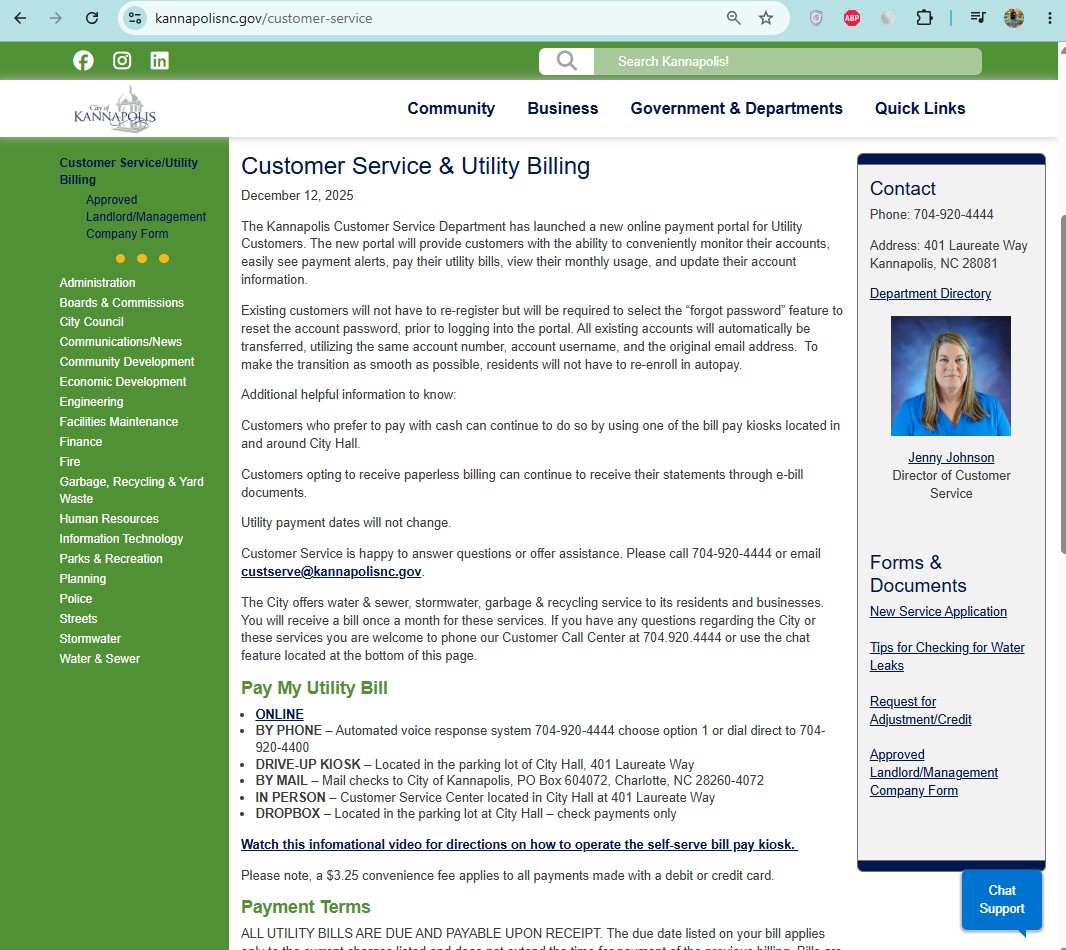
How to pay City of Kannapolis water bill online
Online payment is the easiest option when your account is current and you have your bill or account details ready. Start from the official Kannapolis bill portal, not an old bookmarked Customer Connect URL.
Kannapolis online bill portal: what you can do
The Kannapolis utility billing portal is more than a payment screen. It is designed to help customers manage accounts, see payment alerts, pay bills, view water and sewer usage, set up autopay and receive electronic statements.
| Portal feature | Best for | Practical tip |
|---|---|---|
| Pay utility bill | Current water, sewer, stormwater, garbage and recycling utility charges | Save confirmation after each payment. |
| Payment alerts | Avoiding missed payments and account surprises | Read alerts before paying, especially after a portal update. |
| Usage history | Checking water and sewer consumption changes | Compare usage, not only dollar amount, when reviewing a high bill. |
| Autopay | Recurring payments | Confirm autopay is active and payment method is current. |
| Electronic statements | Paperless billing and faster bill delivery | Use an email address you check regularly. |
City of Kannapolis water bill lookup: balance, usage, payment and account status
Many users search for “Kannapolis water bill lookup” because they want to check balance, payment status, due date, usage history or account alerts. The official bill portal is the best starting point.
| Lookup need | Where to start | What to keep ready |
|---|---|---|
| Current balance | Official bill portal | Utility bill, account details and service address. |
| Payment posted? | Portal + Customer Service | Confirmation number, date, amount and payment method. |
| Water/sewer usage | Portal usage history | Current bill and previous usage comparison. |
| Account alert | Portal alert section | Account number and alert message details. |
| Start or stop service | Customer Service | Service address, start date, stop date and customer details. |
Kannapolis autopay and electronic statements
Autopay and electronic statements are useful if you want fewer missed payments and faster bill access. After any portal change or bookmark update, always re-check your payment settings.
How to use Kannapolis water and sewer usage history
Usage history is one of the most helpful tools in the online portal. It can help explain a high bill, identify possible leaks and show whether your bill increased because of usage or account charges.
Start, stop or update Kannapolis water/sewer service
The City provides water and sewer, stormwater, garbage and recycling service to customers. For new service, billing inquiries, customer service and meter reading questions, contact Customer Service / Utility Billing.
Why your City of Kannapolis water bill may be high
A high Kannapolis utility bill may come from water usage, sewer charges, stormwater, garbage/recycling service, seasonal irrigation, a running toilet, an outside leak, previous balance, payment timing or account alerts.
Report water, sewer, stormwater or public works problems
For water, wastewater, stormwater, streets and roads issues, Kannapolis directs customers to report Public Works problems or call the Customer Service Center. Water and sewer issue lines are answered 24 hours a day, 7 days a week and on holidays.
| Problem | Best action | What to provide |
|---|---|---|
| Water issue | Call 704-920-4444 or use city reporting tools | Address, cross street, visible water issue and urgency. |
| Wastewater/sewer issue | Report to Public Works / Customer Service | Location, backup/overflow details and nearby address. |
| Stormwater concern | Use city reporting route | Drainage location, flooding details and photos if available. |
| Street/road related utility issue | Report Public Works problem | Street name, nearest address and safety concern. |
City of Kannapolis water bill phone number, email and office
| Contact item | Official detail | Use it for |
|---|---|---|
| Customer Service / Utility Billing | 704-920-4444 | Billing, payment, account, start service, usage and utility service questions. |
| custserve@kannapolisnc.gov | Non-urgent utility billing questions and account help. | |
| Office address | 401 Laureate Way, Kannapolis, NC 28081 | City Hall / Customer Service Center reference. |
| Office hours | Monday–Friday, 8:00 AM–5:00 PM, except City holidays | Planning a call or visit for utility billing help. |
| Problem reporting | 704-920-4444 | Water, sewer, stormwater and public works problem reporting. |
City of Kannapolis Customer Service Center map
The map below points to 401 Laureate Way, Kannapolis, NC 28081. Use official Kannapolis resources for live portal, payment, service and account decisions.
Common City of Kannapolis water bill mistakes to avoid
| Mistake | Why it causes trouble | Better action |
|---|---|---|
| Using the old portal bookmark | The old Customer Connect page says the site moved. | Use billpay.kannapolisnc.gov and update bookmarks. |
| Not saving confirmation | Harder to prove payment if posting is delayed. | Save confirmation number, email, receipt or screenshot. |
| Assuming autopay is active | Payment settings can change after portal updates or card changes. | Log in and verify autopay before the due date. |
| Only checking dollar amount | The bill can include water, sewer, stormwater, garbage and recycling charges. | Review usage and charge categories. |
| Waiting to call on urgent issues | Portal payment may not answer account-status questions. | Call 704-920-4444 if payment posting or service status matters today. |
Official City of Kannapolis water bill resources
Use these official links for final action. This guide explains the process, but live balance, payment posting, service status, fees, autopay and account decisions must be confirmed through official City of Kannapolis resources.
City of Kannapolis online bill portal Customer Service / Utility Billing Old Customer Connect moved notice New online payment portal notice Water, Sewer and Stormwater New to Kannapolis utility service informationCity of Kannapolis water bill FAQs
How do I pay my City of Kannapolis water bill online?
Use the official online bill portal at billpay.kannapolisnc.gov. The older Customer Connect page says it has moved to this new billpay address.
What is the City of Kannapolis utility billing phone number?
City of Kannapolis Customer Service / Utility Billing lists phone support at 704-920-4444.
What is the City of Kannapolis utility billing email?
The official utility billing email is custserve@kannapolisnc.gov.
Where is Kannapolis Customer Service / Utility Billing located?
The Customer Service Center is listed at 401 Laureate Way, Kannapolis, NC 28081.
Can I set up autopay for my Kannapolis water bill?
Yes. The Kannapolis utility portal describes autopay as one of its features. Log in to the official portal and confirm enrollment before relying on it.
Can I receive electronic statements?
Yes. The utility portal describes electronic statements as one of its account-management features.
Can I view water and sewer usage history online?
Yes. Kannapolis describes usage history as one of the online utility portal features, helping customers review water and sewer consumption history.
What should I do if my payment did not post?
Call 704-920-4444 or email custserve@kannapolisnc.gov with your account details, payment date, amount, method and confirmation number.
Who do I call for water, sewer or stormwater problems?
Kannapolis lists 704-920-4444 for Public Works problems including water, wastewater, stormwater, streets and roads. Water and sewer lines are answered 24 hours a day, 7 days a week and on holidays.
Why is my Kannapolis utility bill high?
A high bill may come from water usage, sewer, stormwater, garbage/recycling service, outdoor watering, a running toilet, a leak, previous balance, payment timing or account alerts.
Is Water-Department.org the City of Kannapolis?
No. Water-Department.org is an independent informational guide and is not the City of Kannapolis. Always verify current balance, payment posting, fees, portal access and service status through official City of Kannapolis resources.
Last editorial check: June 2026. Official payment links, phone numbers, portal features, payment rules, customer service details, autopay settings and account procedures can change. Confirm current details directly with City of Kannapolis Customer Service / Utility Billing before paying, visiting, reporting a problem or making account decisions.
Pay Smarter, Check High Bills, Start Service, Avoid Shutoff and Find Official Water Department Links
Use this free tool before paying a water bill, setting up autopay, starting or stopping service, checking a high bill, requesting leak help, or looking for the official water department portal. It gives practical next steps without collecting your account number or personal details.
What water bill or service problem do you need to solve?
Choose your situation. The tool will suggest the safest next step, what to prepare, and which official page to check first.
Start from the official water department, city, county or utility website before entering account details. Avoid random payment ads and look-alike bill pay sites.
Before paying a very unusual bill, check meter reads, toilet leaks, irrigation use, estimated bills, late fees, and whether your utility offers a leak adjustment.
Water Bill Payment Route Helper
Choose how you want to pay. The tool will tell you what to prepare and the safest payment path.
High Water Bill Checker
Compare your normal bill with the new bill and get a practical investigation path before calling customer service.
Leak Check and Adjustment Checklist
Use this before requesting a leak adjustment, disputing a bill, or calling the water department about high usage.
Start, Stop or Transfer Water Service Helper
Use this before moving, opening a new account, closing an old account, or transferring service to another address.
Past Due, Shutoff and Reconnection Helper
Use this if your account is late, disconnected, at risk of shutoff, or you need a payment plan or assistance program.
Simple Water Usage Cost Estimator
Estimate a rough bill from base charge, usage units, rate per unit, sewer charge, stormwater fee and service fees. Official tiered rates may be different.
Official Water Department Resource Finder
Enter city/utility and state to create safe searches for the official water bill portal, phone number, outage page, assistance, start service, leak adjustment, and Water-Department.org guide.
Water Department vs Payment Processor
- Water department: account help, service start/stop, leaks, repairs, shutoff, assistance.
- Payment processor: card/eCheck payment screen, payment fee, confirmation number, posting time.
Best sitewide placement
Add this tool after the main payment section or before FAQs. It helps users solve the next problem after reading the article.
Important safety note
This tool gives educational guidance only. Always confirm payment portals, phone numbers, account balance, assistance rules and reconnection steps with the official water department or utility.