
WaterSmart Bill Payment, AutoPay, Paperless Billing, Phone Help and Water Rates
City of Sterling Heights water and sewer customers can pay online through WaterSmart, set up AutoPay, enroll in paperless billing, compare usage, detect leaks early, review residential rates, request a final water bill and contact Water Billing for account help. This guide gives you the official links, phone number, posting rules, rate details and high-bill checks in one simple place.
How to pay a City of Sterling Heights water bill
To pay a City of Sterling Heights water bill online, start from the official Water & Sewer Billing page or open the WaterSmart portal. WaterSmart is the City’s online route to view and pay monthly water bills, compare past usage, track water use, receive leak/emergency notifications and sign up for outage or boil-water advisories. For account help, call 586-446-2320 or email waterbilling@sterlingheights.gov.
What do you need to do today?
Sterling Heights water customers usually need one of these routes: pay through WaterSmart, set up AutoPay, enroll in paperless billing, review rates, request a final bill, check a high bill or contact Water Billing.
Official Sterling Heights water bill payment and service links
Use these official City of Sterling Heights and WaterSmart links for water bill payment, WaterSmart login, AutoPay, paperless billing, rates, final bill request, online payment help and high-bill FAQs.
Sterling Heights WaterSmart bill payment and AutoPay screenshot guide
The screenshot below helps users recognize the official City of Sterling Heights WaterSmart bill payment and water billing options before using the online portal, AutoPay setup, paperless billing, phone support, rates or final bill links.
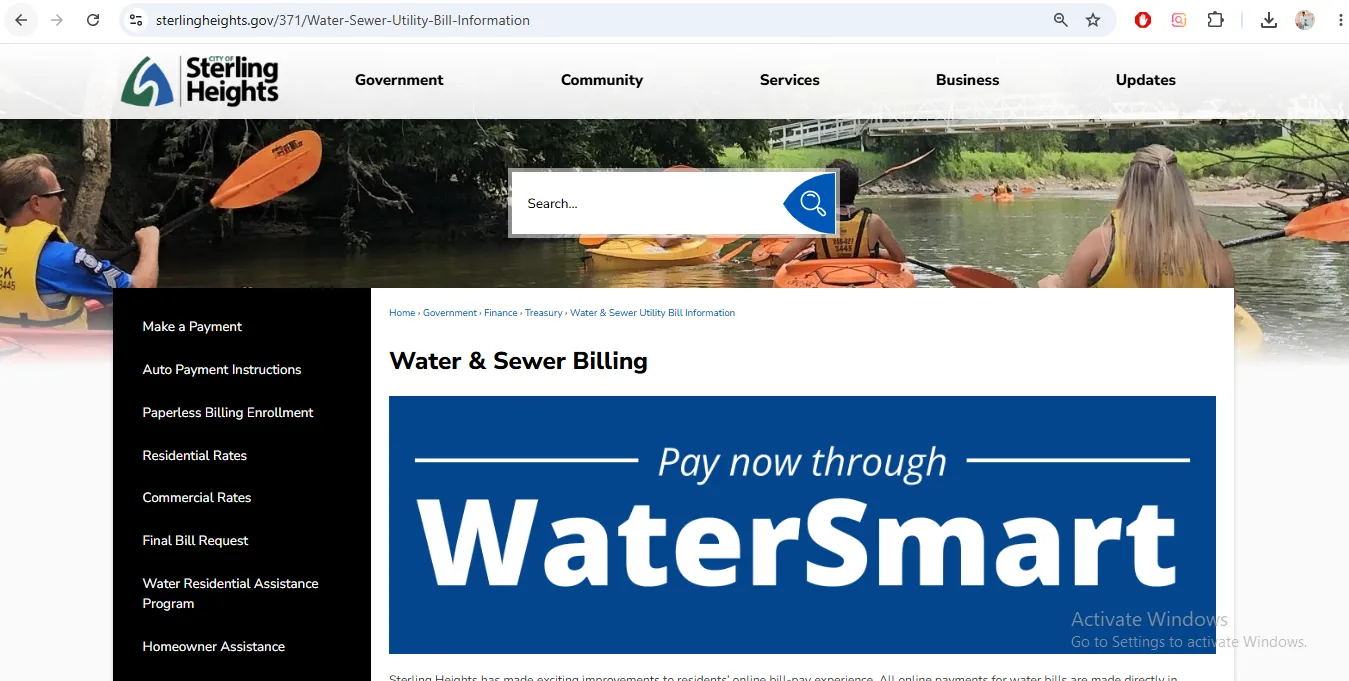
Image note: This image is used only as a user-help visual reference near the official action section. It is not payment proof, account proof, a live portal, or an official endorsement.
How to pay your Sterling Heights water bill through WaterSmart
WaterSmart is the official Sterling Heights online route for water bill payment and account usage tools. It is not only a payment page; it also helps track usage and possible leaks.
What WaterSmart can help you do after login
View and pay bills
Use the portal to view and pay your monthly water bill.
Compare usage
Compare current bills to past usage and community averages.
Detect leaks early
Use emergency notifications and water-use tools to notice problems earlier.
| WaterSmart feature | Why it helps | Best action |
|---|---|---|
| Monthly bill payment | Keeps payment and usage tools in one portal. | Log in before the due date and save confirmation. |
| Past usage comparison | Shows whether a bill increase is tied to real consumption. | Compare current usage with last month and same season last year. |
| Leak and potential-problem notifications | May warn you before a water problem becomes expensive. | Keep email/contact details updated in the portal. |
| Outage and boil-water advisories | Helps you receive critical water notices. | Sign up for notifications and check settings after creating the account. |
| Water-saving tips | Gives customized tips based on household profile. | Use tips after a high bill or irrigation season starts. |
How to set up AutoPay and paperless billing
AutoPay can help avoid missed due dates, but you should still review WaterSmart usage and bill amount each month.
Sterling Heights residential water and sewer rates
The official residential rate sheet says the following rates apply for bills rendered on or after July 1, 2025. Always confirm current rates from the City before using these for exact billing decisions.
| Charge | Official rate | What it means |
|---|---|---|
| Tier 1 water usage | $2.66 per 100 cubic feet for first 12 ccf or less | Applies to lower residential usage within the first tier. |
| Tier 2 water usage | $4.87 per 100 cubic feet over 12 ccf | Higher usage above 12 ccf is billed at the second tier. |
| 5/8-inch water fixed charge | $9.60 monthly | Common residential meter-size fixed water charge. |
| Sewer usage | $7.07 per 100 cubic feet | Usage-based sewer charge. |
| Sewer fixed charge | $8.30 monthly | Monthly fixed sewer charge. |
| Final water/sewer bill preparation fee | $22.00 | Informational fee listed on the residential rate sheet. |
| Water turn-on fee | $109.00 | Informational service fee listed on the residential rate sheet. |
| Bounced check fee | $30.00 | Fee listed for NSF check issues. |
Why a Sterling Heights water bill may be higher than normal
The City FAQ says many high bills come from leaking toilets, but sprinklers, sump backup systems and dripping faucets can also raise usage. Use WaterSmart and the meter check before waiting for another large bill.
Final water bill request for selling or moving
A final water bill is common during home sale or move-out. Do not wait until the closing table if the title company or realtor needs the final bill.
What happens if a Sterling Heights water bill is not paid?
The City FAQ gives a clear note on non-payment. Always confirm current account-specific status with Water Billing before relying on a general FAQ.
| Situation | City FAQ note | Practical action |
|---|---|---|
| Unpaid current bill | If a current bill is not paid by the due date, a one-time late fee of 6% of the charges is added. | Pay before the due date or call Water Billing if something is wrong. |
| Water shutoff for non-payment | The City FAQ says Sterling Heights will not shut water off for non-payment. | Still do not ignore the bill because penalties and tax roll transfer can apply. |
| Bills 179 days past due | Older unpaid bills are removed from the water account and put on property taxes with an added 17% penalty. | Resolve balances early before they move to tax roll status. |
Sterling Heights Water Billing phone, email, City Hall and drop boxes
| Contact item | Official detail | Use it for |
|---|---|---|
| Water Billing phone | 586-446-2320 | Billing questions, final bill, rates, payment concerns and account help. |
| Water Billing email | waterbilling@sterlingheights.gov | Written account questions, final bill reading and follow-up. |
| City Hall address | 40555 Utica Road, Sterling Heights, MI 48313 | City Hall reference and payment drop box location. |
| Drop boxes | Drop boxes are located along the circular driveways near City Hall entrances. | Secure payment drop-off. Do not deposit cash in the drop box. |
| Main City phone | 586-446-2489 | General City Hall contact routing if needed. |
Map shows Sterling Heights City Hall at 40555 Utica Road, Sterling Heights, MI 48313. Bring your bill, account information, payment confirmation, final meter reading, closing date, and any leak/high-bill notes for account-specific help.
What to do if the online payment screen does not work
The City’s online payment help page and FAQ mention common reasons a payment screen may fail. Try the simple fixes first, then call Water Billing if it still does not work.
Common Sterling Heights water bill payment mistakes
| Mistake | Why it causes trouble | Better action |
|---|---|---|
| Using unofficial payment links | Payment may be delayed, misdirected or unsafe. | Start from sterlingheights.gov or sterlingheightsmi.watersmart.com. |
| Expecting instant posting | Online utility payments typically post within 48 hours, and weekends/holidays may take longer. | Pay before the due date and save confirmation. |
| Ignoring WaterSmart leak alerts | A small leak can keep running and raise the next monthly bill. | Check toilets, sprinklers, sump backup systems and faucets quickly. |
| Depositing cash in drop box | The rate sheet says not to deposit cash in the drop box. | Use safer payment methods and keep proof. |
| Waiting too long for a final bill | Final bill preparation may take 48 hours. | Read the meter and contact Water Billing before closing deadlines. |
| Assuming AutoPay means no review needed | A leak can create a large bill that AutoPay may still pay. | Review monthly usage in WaterSmart even after AutoPay is active. |
Official Sterling Heights water bill resources used in this guide
| Official resource | Use it for | Open |
|---|---|---|
| Water & Sewer Billing | WaterSmart payment, Water Billing phone/email, AutoPay, paperless billing, rates and final bill links. | Open water billing |
| WaterSmart Portal | Online bill payment, usage comparison, leak notifications, advisories and water-saving tips. | Open WaterSmart |
| Pay a Bill | Utility billing payment processor and typical online payment posting time. | Open Pay a Bill |
| AutoPay Instructions | Recurring payment setup and paperless billing activation guidance. | Open AutoPay PDF |
| Residential Water and Sewer Rates | Current residential usage rates, fixed charges, final bill fee and meter/turn-on fees. | Open rate sheet |
| Online Payment Help | Troubleshooting payment screen problems. | Open payment help |
| Final Bill Request | Final water/sewer bill when selling or moving. | Open final bill form |
| Water & Sewer Billing FAQ | High-bill reasons, leak checks, non-payment note, final bill instructions and payment FAQ. | Open FAQ |
City of Sterling Heights water bill payment FAQs
How do I pay my City of Sterling Heights water bill online?
Use the official City of Sterling Heights Water & Sewer Billing page or the WaterSmart portal. WaterSmart is the official online route for viewing and paying monthly water bills.
What is WaterSmart for Sterling Heights?
WaterSmart is the City’s online water bill and usage portal. It helps customers view and pay bills, compare past usage, track water use, detect leaks early, receive advisories and access water-saving tips.
What is the Sterling Heights Water Billing phone number?
Call Water Billing at 586-446-2320.
What is the Sterling Heights Water Billing email?
The City lists waterbilling@sterlingheights.gov for Water Billing questions.
How long do Sterling Heights online water bill payments take to post?
The City says online utility bill payments are typically posted within 48 hours. Payments made on Fridays, holidays or over the weekend may take additional time to process.
Who processes Sterling Heights utility payments?
The Pay a Bill page says the payment processor for Utility Billing is Paymentus.
How do I set up AutoPay for my Sterling Heights water bill?
Use the official WaterSmart / payment route and the City’s AutoPay instructions. Create or sign in to your account, choose recurring payments, select the frequency/date setting and save the recurring payment setup.
Can I enroll in paperless billing?
Yes. The Water & Sewer Billing page links to paperless billing enrollment. The AutoPay instructions say paperless billing may require the activation code from the bottom left corner of the water bill.
What are Sterling Heights residential water rates?
For bills rendered on or after July 1, 2025, the official residential rate sheet lists Tier 1 water usage at $2.66 per 100 cubic feet for the first 12 ccf or less, and Tier 2 over 12 ccf at $4.87 per 100 cubic feet.
What is the Sterling Heights sewer rate?
The residential rate sheet lists sewer usage at $7.07 per 100 cubic feet and a monthly sewer fixed charge of $8.30.
What is the 5/8-inch monthly water fixed charge?
The residential rate sheet lists the 5/8-inch monthly water fixed charge as $9.60 for bills rendered on or after July 1, 2025.
Why is my Sterling Heights water bill higher than normal?
The City FAQ says many high water bills are due to leaking toilets. Other things to check include sprinkler system leaks, sump pumps with water-backup systems and dripping faucets.
How do I check for a leak using my meter?
The City FAQ suggests writing down the eight-digit meter number before bed and comparing it in the morning. If the meter moved while no water was used, something may be using water. The red dial should be still when no water is being used.
Will Sterling Heights shut off water for non-payment?
The City FAQ says Sterling Heights will not shut water off for non-payment. It also says unpaid current bills receive a one-time late fee, and older delinquent bills may be transferred to property taxes with an additional penalty.
How do I request a final water bill?
Use the official final bill request form or contact Water Billing. The FAQ says to determine the date through which the bill should be paid, read the meter immediately before that date, and contact Water Billing. Allow 48 hours for final bill preparation.
Where are payment drop boxes?
The residential rate sheet says drop boxes are located along the circular driveways near City Hall entrances. It also says not to deposit cash in the drop box.
Where is Sterling Heights City Hall?
City Hall is listed at 40555 Utica Road, Sterling Heights, MI 48313.
Is Water-Department.org the official City of Sterling Heights website?
No. Water-Department.org is an independent guide. Official payments, AutoPay setup, paperless billing, rates, final bill requests and account decisions must be handled through City of Sterling Heights or WaterSmart official resources.
Last editorial check: June 2026. Payment links, WaterSmart features, processor details, posting times, phone numbers, rates, fees, AutoPay setup, final bill instructions and high-bill leak guidance can change. Confirm final details directly with City of Sterling Heights Water Billing or the official WaterSmart portal.
Pay Smarter, Check High Bills, Start Service, Avoid Shutoff and Find Official Water Department Links
Use this free tool before paying a water bill, setting up autopay, starting or stopping service, checking a high bill, requesting leak help, or looking for the official water department portal. It gives practical next steps without collecting your account number or personal details.
What water bill or service problem do you need to solve?
Choose your situation. The tool will suggest the safest next step, what to prepare, and which official page to check first.
Start from the official water department, city, county or utility website before entering account details. Avoid random payment ads and look-alike bill pay sites.
Before paying a very unusual bill, check meter reads, toilet leaks, irrigation use, estimated bills, late fees, and whether your utility offers a leak adjustment.
Water Bill Payment Route Helper
Choose how you want to pay. The tool will tell you what to prepare and the safest payment path.
High Water Bill Checker
Compare your normal bill with the new bill and get a practical investigation path before calling customer service.
Leak Check and Adjustment Checklist
Use this before requesting a leak adjustment, disputing a bill, or calling the water department about high usage.
Start, Stop or Transfer Water Service Helper
Use this before moving, opening a new account, closing an old account, or transferring service to another address.
Past Due, Shutoff and Reconnection Helper
Use this if your account is late, disconnected, at risk of shutoff, or you need a payment plan or assistance program.
Simple Water Usage Cost Estimator
Estimate a rough bill from base charge, usage units, rate per unit, sewer charge, stormwater fee and service fees. Official tiered rates may be different.
Official Water Department Resource Finder
Enter city/utility and state to create safe searches for the official water bill portal, phone number, outage page, assistance, start service, leak adjustment, and Water-Department.org guide.
Water Department vs Payment Processor
- Water department: account help, service start/stop, leaks, repairs, shutoff, assistance.
- Payment processor: card/eCheck payment screen, payment fee, confirmation number, posting time.
Best sitewide placement
Add this tool after the main payment section or before FAQs. It helps users solve the next problem after reading the article.
Important safety note
This tool gives educational guidance only. Always confirm payment portals, phone numbers, account balance, assistance rules and reconnection steps with the official water department or utility.