
Houston City Water Bill: pay online, check usage, start service, request adjustment and get account help
Use this Houston City Water Bill guide to pay your water and wastewater bill, view account transactions, print prior bills, start or move-in service, track usage, set alerts, request an adjustment for a high bill or leak, and contact Houston Customer Account Services without wasting time on the wrong page.
The safest starting point is the official City of Houston water bill portal or Houston Public Works Utility Billing page. For account questions, high-bill questions, set-usage concerns, payment issues or adjustment guidance, call Customer Account Services at 713-371-1400.
Quick answer: how to handle a Houston water bill
If you only need to pay, use the official City of Houston water bill portal. If the bill is unusually high, do not only pay and move on. First check water usage, prior bills, account transactions, estimated or actual billing notes, leak signs and adjustment eligibility.
For account help, Houston Public Works directs water bill customers to Customer Account Services at 713-371-1400. If the bill is high because of a leak, unexplained usage or exceptional circumstances, use the official Universal Adjustment Request form and keep repair proof or usage screenshots ready.
Quick navigation
Houston City Water Bill screenshot guide
The screenshot below is included as a visual guide for the Houston City Water Bill topic. Use it to recognize the page intent and the bill-payment workflow. For final payment, account balance, adjustment status or service action, always use the live City of Houston or Houston Public Works links.
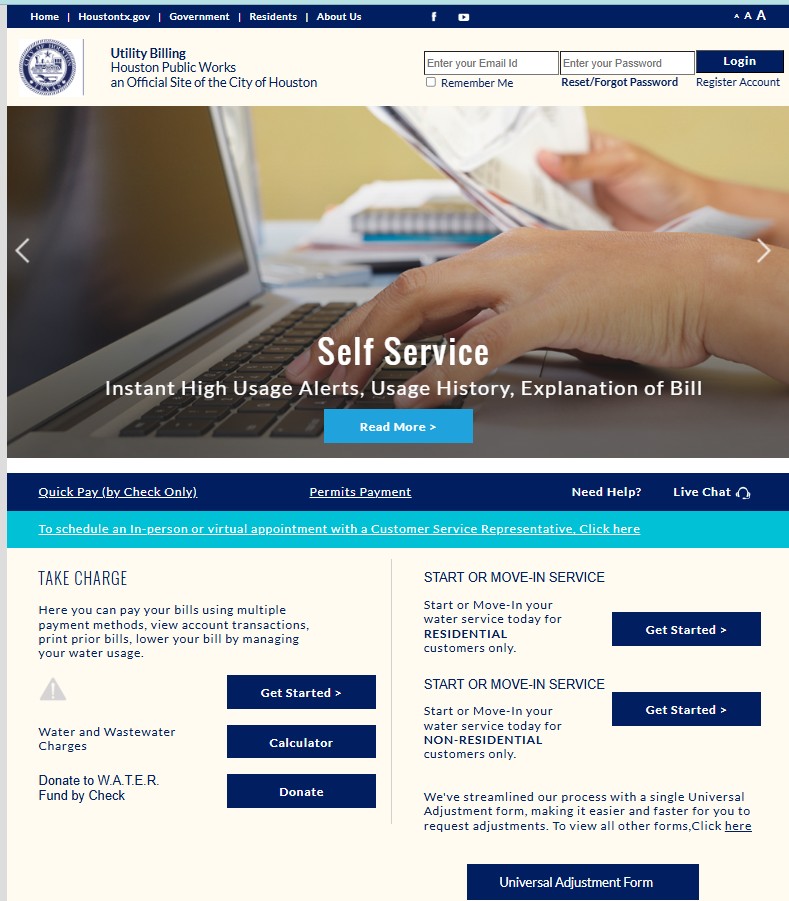
How to pay your Houston city water bill online
The official Houston water bill page allows customers to pay bills, view account transactions, print prior bills and manage water usage. Use the official route instead of random third-party search results.
Houston water bill decision helper
Use this quick guide when you are not sure whether to pay, call, check usage, request an adjustment or start service.
Pay through the City of Houston water bills page. Confirm account and service address before submitting payment.
💳 Pay onlineReview prior bills, usage history, remote read/meter changes, toilets, irrigation and leaks before assuming the bill is correct.
🔎 High-bill checklistSubmit the Universal Adjustment Request for leak, unusually high bill or exceptional-circumstance review when applicable.
🧾 Request adjustmentHouston Public Works lists start or move-in service options for residential and non-residential customers.
🏠 Start serviceUse this number for water bill account questions, high bill concerns, set usage questions and customer service help.
☎️ Call nowFor service requests and city issues, use Houston 311 instead of the bill-payment portal.
📲 Houston 311What you can do inside the Houston water bill portal
The portal is more useful when you use it as an account-checking tool, not only a payment screen. Before paying, look at usage, prior bills and transactions.
| Portal task | Why it matters | Practical tip |
|---|---|---|
| Pay water and wastewater bill | Completes your current payment through the official route | Confirm service address, account and amount before submitting. |
| View account transactions | Shows recent payments, adjustments or balance changes | Use this before calling about a payment that did not post. |
| Print prior bills | Helps compare high bill months with normal months | Download the last 6–12 months before filing an adjustment request. |
| Manage usage | Can reveal leak patterns, irrigation spikes or unusual daily use | Look for continuous usage during hours when nobody used water. |
| Start or move-in service | Needed for new residential or non-residential customer accounts | Start early and keep move-in date, service address and ID/account documents ready. |
Houston high water bill checklist
A high Houston water bill can come from actual usage, a leak, irrigation, a toilet problem, estimated-to-actual billing, remote read device updates, prior balance, rate changes or adjustment timing. Use this checklist before submitting a request.
| Problem clue | Possible reason | Best action |
|---|---|---|
| Usage doubled or tripled | Leak, irrigation, pool fill, toilet, meter reading change or actual high use | Download prior bills and start the high-bill review workflow. |
| Usage runs overnight | Toilet, irrigation valve, water softener, broken line or hidden leak | Turn off fixtures, test toilets and inspect outside plumbing. |
| Amount is high but usage is normal | Prior balance, fee, rate, sewer/wastewater charge, adjustment reversal or late payment issue | Check transaction history and call with bill PDFs ready. |
| Bill changed after device replacement | Estimated-to-actual usage update or remote read device transition | Ask Customer Account Services whether the account had estimated billing or corrected readings. |
Houston water bill adjustment request: when to use it
Houston Public Works links a Universal Adjustment Request for unusually high bills, leaks and exceptional circumstances. The form page states that if there is no leak repair, Houston Public Works will review the account for the most beneficial water bill adjustment. It also mentions an Unusually Large Bill review for unexplained usage over 200% of average consumption, with application received within six months of the high bill date.
Leak-check routine before calling Houston Customer Account Services
Do these checks before calling. You will give clearer answers and avoid paying for unnecessary inspections.
Houston water usage alerts video guide
Houston Public Works has a helpful official video explaining how customers with an upgraded Sensus remote reading device can set usage alerts in the online profile. This is useful for catching leaks before the next high bill arrives.
Start or move-in Houston water service
Houston Public Works Utility Billing resources include start or move-in service options for residential and non-residential customers. Start early because account setup may require identity, property, lease, business or service-address details.
| Customer type | Where to start | What to prepare |
|---|---|---|
| Residential customer | Houston Public Works Utility Billing start/move-in option | Service address, move-in date, customer details, ID/account information and contact details. |
| Non-residential customer | Houston Public Works non-residential start/move-in route | Business name, service address, authorized contact, billing details and service start date. |
| Moving out or transfer | Use official account service options or call Customer Account Services | Old address, new address if applicable, final date, forwarding contact and final bill plan. |
What to say when you call Houston water bill customer service
Use these short call scripts to get faster help. Keep your account number, service address, bill date, usage screenshot and payment/adjustment proof ready.
| Your problem | What to say | What to have ready |
|---|---|---|
| High bill | “My bill is unusually high. Can you help me review usage, prior bills, meter/remote read status and adjustment options?” | Current bill, prior bills, usage history, screenshots and leak checks. |
| Possible leak | “I found or suspect a leak. What repair proof and dates do I need for an adjustment review?” | Repair invoice, receipt, photos, repair date and high bill date. |
| Payment did not post | “I made a payment, but my account does not show it. Can you check the posting status?” | Confirmation number, payment date, amount, card/bank record and account number. |
| Adjustment pending | “I submitted an adjustment request. What amount should I pay while the review is pending?” | Submission date, case number if any, bill amount and due date. |
| Start service | “I need to start or move-in water service. What documents and dates are required?” | Service address, move-in date, ID/contact info and residential/business details. |
Documents and details to keep ready
Before paying, calling or requesting an adjustment, collect the information below. This saves time and reduces account confusion.
Common Houston water bill mistakes to avoid
Most billing problems become harder when customers wait too long, skip usage review, or submit adjustment requests without proof.
| Mistake | Why it causes trouble | Better action |
|---|---|---|
| Paying a huge bill without checking usage | You may miss a leak or adjustment deadline. | Review usage, prior bills and leak signs before paying or call for guidance. |
| Submitting adjustment request without proof | The review may be delayed or incomplete. | Attach bills, screenshots, repair receipts and a short timeline. |
| Ignoring toilets | Toilet leaks can be silent and expensive. | Run a dye test and repair before more usage accumulates. |
| Calling 311 for bill balance | Bill account help belongs with Customer Account Services. | Call 713-371-1400 for account/billing questions. |
| Not saving payment confirmation | You may struggle to prove payment if posting is delayed. | Save the confirmation number, date, amount and account details. |
Houston Public Works customer service office map
Houston Public Works has referenced in-person customer-service appointments at 4200 Leeland. For billing, adjustment or account concerns, confirm appointment options and current instructions before visiting.
Official Houston water bill resources
Use these official links for final action. This guide helps explain the process, but payments, account status, adjustment decisions and service changes must be completed through City of Houston or Houston Public Works resources.
City of Houston water bills page Houston Public Works Utility Billing Universal Adjustment Request form Improve Water Bills information Houston 311 service requests Houston Public Works usage alerts videoHouston City Water Bill FAQs
How do I pay my Houston city water bill online?
Use the official City of Houston water bills page or Houston Public Works Utility Billing page. Sign in or enter your account details, review the balance and usage, choose a payment method and save your confirmation.
What is the Houston water bill customer service number?
Houston water bill customers with account or billing questions should call Customer Account Services at 713-371-1400.
Where can I request a Houston water bill adjustment?
Use the official Universal Adjustment Request form for unusually high bills, leaks or exceptional circumstances. Keep your account details, high bill date and repair proof if applicable.
Can Houston water customers request help for an unusually large bill?
Yes. Houston’s adjustment request page says an unusually large bill review may apply when unexplained usage is over 200% of average consumption, and the application must be received within six months of the high bill date.
What should I do if my Houston water bill is suddenly high?
Check usage history, look for leaks, review recent meter or remote read device changes, save screenshots, check toilets and irrigation, then call 713-371-1400 or submit the official adjustment request if appropriate.
Can I start or move-in Houston water service online?
Yes. Houston Public Works Utility Billing resources include start or move-in service options for residential and non-residential customers.
Can I view prior Houston water bills online?
The City of Houston water bills page says customers can view account transactions and print prior bills through the online water bill system.
Can Houston water customers set usage alerts?
Houston Public Works has an official usage-alert video for customers with upgraded Sensus remote reading devices. Usage alerts can help customers monitor water consumption and catch possible leaks earlier.
Should I pay before disputing a high Houston water bill?
If the account is near a deadline or service action, call Customer Account Services before assuming online payment alone will solve the issue. Ask what amount must be paid while the high-bill or adjustment request is reviewed.
Is Water-Department.org the official City of Houston water bill website?
No. Water-Department.org is an independent guide. Customers should complete payments, adjustment requests, service starts and official account actions only through City of Houston or Houston Public Works resources.
Last editorial check: June 2026. Official phone numbers, forms, payment systems, adjustment rules, appointment options and customer-service procedures can change. Confirm current account details directly with Houston Public Works or City of Houston official resources before paying, filing, disputing or visiting.
Pay Smarter, Check High Bills, Start Service, Avoid Shutoff and Find Official Water Department Links
Use this free tool before paying a water bill, setting up autopay, starting or stopping service, checking a high bill, requesting leak help, or looking for the official water department portal. It gives practical next steps without collecting your account number or personal details.
What water bill or service problem do you need to solve?
Choose your situation. The tool will suggest the safest next step, what to prepare, and which official page to check first.
Start from the official water department, city, county or utility website before entering account details. Avoid random payment ads and look-alike bill pay sites.
Before paying a very unusual bill, check meter reads, toilet leaks, irrigation use, estimated bills, late fees, and whether your utility offers a leak adjustment.
Water Bill Payment Route Helper
Choose how you want to pay. The tool will tell you what to prepare and the safest payment path.
High Water Bill Checker
Compare your normal bill with the new bill and get a practical investigation path before calling customer service.
Leak Check and Adjustment Checklist
Use this before requesting a leak adjustment, disputing a bill, or calling the water department about high usage.
Start, Stop or Transfer Water Service Helper
Use this before moving, opening a new account, closing an old account, or transferring service to another address.
Past Due, Shutoff and Reconnection Helper
Use this if your account is late, disconnected, at risk of shutoff, or you need a payment plan or assistance program.
Simple Water Usage Cost Estimator
Estimate a rough bill from base charge, usage units, rate per unit, sewer charge, stormwater fee and service fees. Official tiered rates may be different.
Official Water Department Resource Finder
Enter city/utility and state to create safe searches for the official water bill portal, phone number, outage page, assistance, start service, leak adjustment, and Water-Department.org guide.
Water Department vs Payment Processor
- Water department: account help, service start/stop, leaks, repairs, shutoff, assistance.
- Payment processor: card/eCheck payment screen, payment fee, confirmation number, posting time.
Best sitewide placement
Add this tool after the main payment section or before FAQs. It helps users solve the next problem after reading the article.
Important safety note
This tool gives educational guidance only. Always confirm payment portals, phone numbers, account balance, assistance rules and reconnection steps with the official water department or utility.